
User guide
Accounting and tax
12 sections13 min read
Accounting keeps the books in your company’s own currency: payments, journals, the bank, the statements and month end. India’s GST, e-invoice, e-way bill and TDS need the India compliance add-on.
The Accounting home
Section titled “The Accounting home”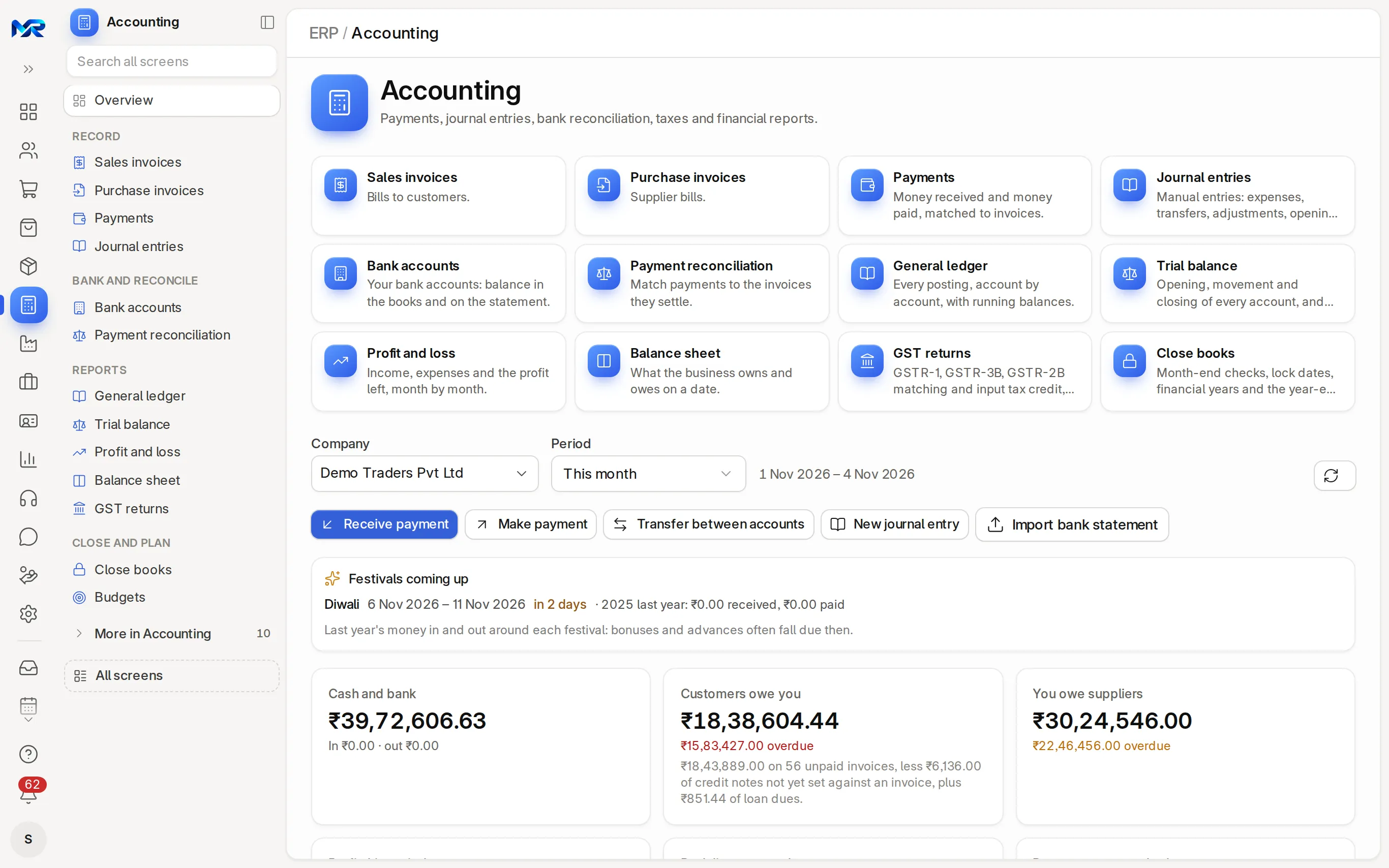
- Company and PeriodSet what every figure covers. Refresh reloads; Books locked till shows the lock date.
- Action buttonsReceive payment, Make payment, Transfer between accounts, New journal entry and Import bank statement, as far as your role allows.
- Set up your booksA first-run checklist, each step ticked from your data.
- Key figuresCash and bank, what customers owe you and what you owe suppliers (with the overdue part), the period’s profit or loss, bank lines to match and payments not matched. Click a figure to open the records behind it.
- ChartsCash flow and income and expenses over 12 months, both sides’ dues by days overdue, and the top expenses.
- Work listsOverdue customer invoices, bills due in the next 7 days, bank lines to match, Waiting for you (drafts and unmatched payments) and each bank and cash balance.
- Explain my monthExplain lists the month’s figures in plain lines. With the AI Assistant add-on, the assistant words them as a short summary.
- Cash in 30 daysThe bank and cash balance expected from the due dates of open invoices and bills, with a chart.
- TabsDay book (every voucher of a day, Previous day and Next day), Reports (Pin to the home) and Look at these (Collect first, overdue customers with their payment risk; Journals to look at, unusual journals of 30 days). Print dashboard prints the page.
- How work flowsThe Selling and Buying steps with their counts, quotation to payment received and material request to payment made.
- IndiaFestivals coming up (money in and out around each festival last year), GST to pay in cash with the GSTR-3B due date, and MSME bills unpaid beyond 45 days (not deductible until paid).
The everyday menu
Section titled “The everyday menu”| Group | Entry | What it is for |
|---|---|---|
| Record | Sales invoices | Bills to customers |
| Purchase invoices | Supplier bills | |
| Payments | Money received and paid, matched to invoices | |
| Journal entries | Expenses, transfers, adjustments, opening balances | |
| Bank and reconcile | Bank accounts | Each account’s book balance beside the statement; Reconcile, Transfer money |
| Payment reconciliation | Set payments and credit notes against the invoices they settle | |
| Reports | General ledger | Every posting, account by account, with running balances |
| Trial balance | Opening, movement and closing of every account | |
| Profit and loss | Income, expenses and profit, period by period | |
| Balance sheet | What the business owns and owes on a date | |
| GST returns | India: GSTR-1, GSTR-3B, GSTR-2B matching, ITC, e-invoices, e-way bills, TDS | |
| Close and plan | Close books | Month-end checks, lock dates, financial years, the year-end close |
| Budgets | Spending limits per expense head and cost center, against spend |
More in Accounting, at the foot of the menu:
| Group | Entry | What it is for |
|---|---|---|
| Books | Chart of accounts | Accounts as a tree with balances; add, rename, merge or freeze one |
| Journal entry tools | Quick entry, From a template, Opening balances, Tally imports | |
| Cost centers | Departments, branches or projects you track income and costs by | |
| Payment terms templates | Credit days and instalments printed on invoices and bills | |
| Bank | Bank reconciliation | Match statement lines with entries in the books |
| Gateway settlements | India: Razorpay and Cashfree payouts, fees and GST on fees | |
| Bank guarantees | Guarantees given or received; Extend, Record charges, Lock margin as FD | |
| Company and tax | Share register | Shareholders, Issue shares, Transfer shares, Buy back shares, the register |
| TDS categories | India: TDS sections, rates and thresholds | |
| Reminder letters | Letters for overdue invoices, with fees and interest |
Who owes you and Payments received are in Sales; Who you owe, Payments made and MSME payables in Purchasing.
Record a payment
Section titled “Record a payment”- Open the payment window. Press Record payment on a submitted sales invoice, Pay this bill on a supplier bill, or Receive payment or Make payment on the home.
- Fill it in. Amount, Paid by (the mode sets the bank or cash account), Date and Reference (UTR, cheque no.).
- Settle the invoices. From the home, pick the party: Allocate oldest first settles the oldest unpaid invoices or bills and keeps the rest as an advance. Add deduction takes bank charges or, in India, TDS.
- Post it. Press Record payment (or Save as draft). The invoice turns Paid or Partly Paid; the payment’s Invoices settled tab shows what it paid.
Transfer between accounts moves money between your bank and cash accounts (Move money). Undo matching on a payment unlinks the invoices it settled.
Make a journal entry
Section titled “Make a journal entry”- Quick entry for two accounts. Journal entry tools › Quick entry: pick Debit (money goes to) and Credit (money comes from), the Amount, the Reference (UTR, cheque no.) for a bank entry and the Narration. Post puts it in the books; Save as draft keeps it.
- Several lines. Journal entries › New (or New journal entry on the home): Entry Type, Posting Date, then one row per account under Accounting Entries.
- Check the balance. The Lines and balance tab shows Total debit, Total credit and Difference; it must say Balanced.
- Submit. It posts on Submit; the Ledger tab shows what it posted.
On a journal: Reverse, Save as template (filled later with From a template), Make recurring (rent, for example) and Export to Tally.
Reconcile the bank
Section titled “Reconcile the bank”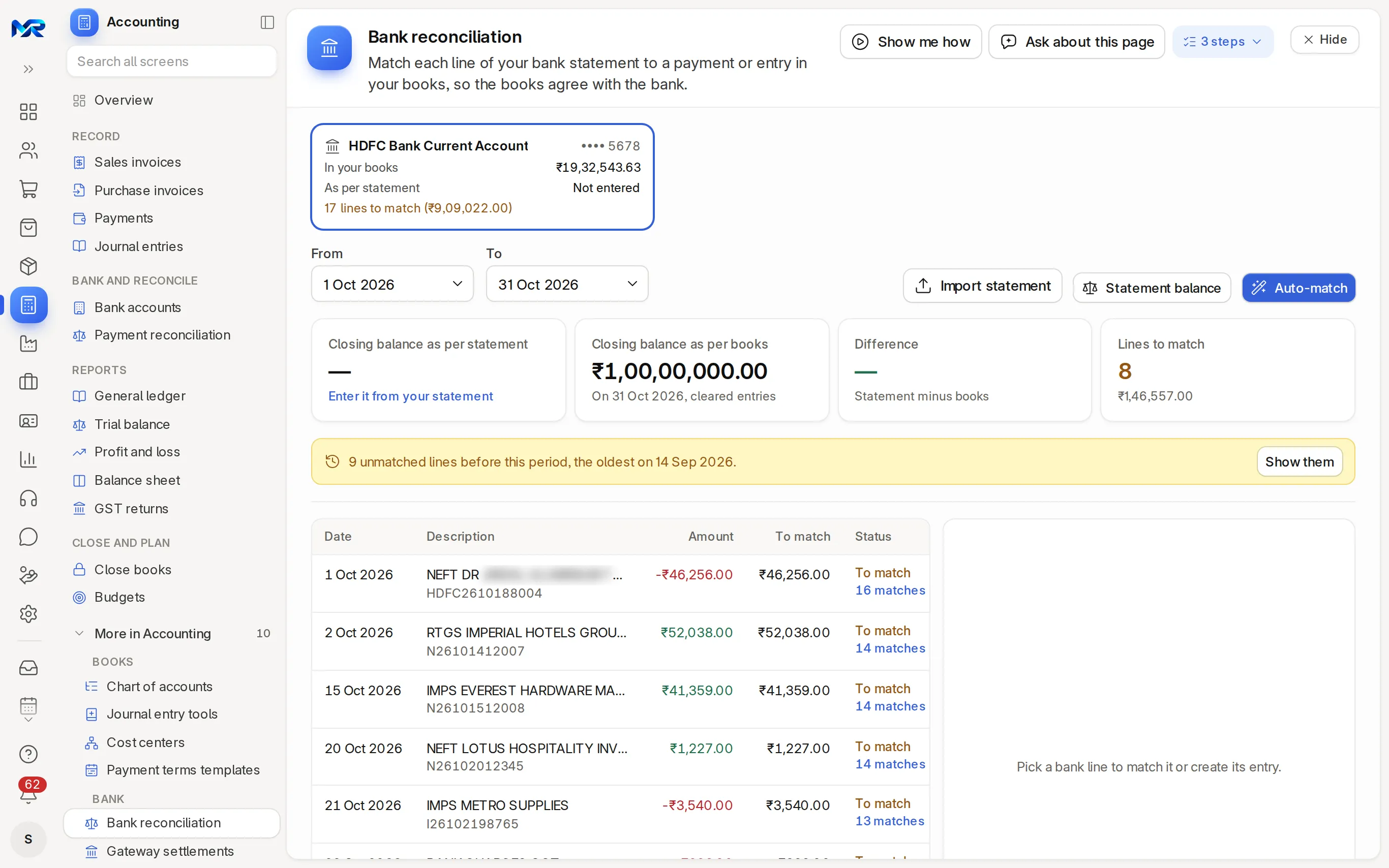
- Pick the account. Open Bank reconciliation (More in Accounting, or Reconcile on Bank accounts) and pick the bank account card and the dates.
- Import the statement. Import statement opens your bank’s CSV, Excel or PDF export (a photo with the AI Assistant add-on) in Import data: each line is checked against the running balance and the entries already there, then imported as bank entries, with undo.
- Enter the closing balance. Statement balance: the closing balance and date on the statement.
- Match each line. Click a line, tick the suggested entries and press Match, or Create and match the missing payment or bank charges. Auto-match does every open line.
- Check the difference. At zero, it says Books and bank agree.
Statements come in as files; there is no automatic bank feed. Unmatch unlinks an entry (one created from the line is cancelled).
India: on Gateway settlements, Fetch from gateways brings each Razorpay or Cashfree payout with its fees and the GST on them; Post journal books it and the bank line carrying its UTR matches by itself. This works once your gateway account is connected.
Match payments to invoices
Section titled “Match payments to invoices”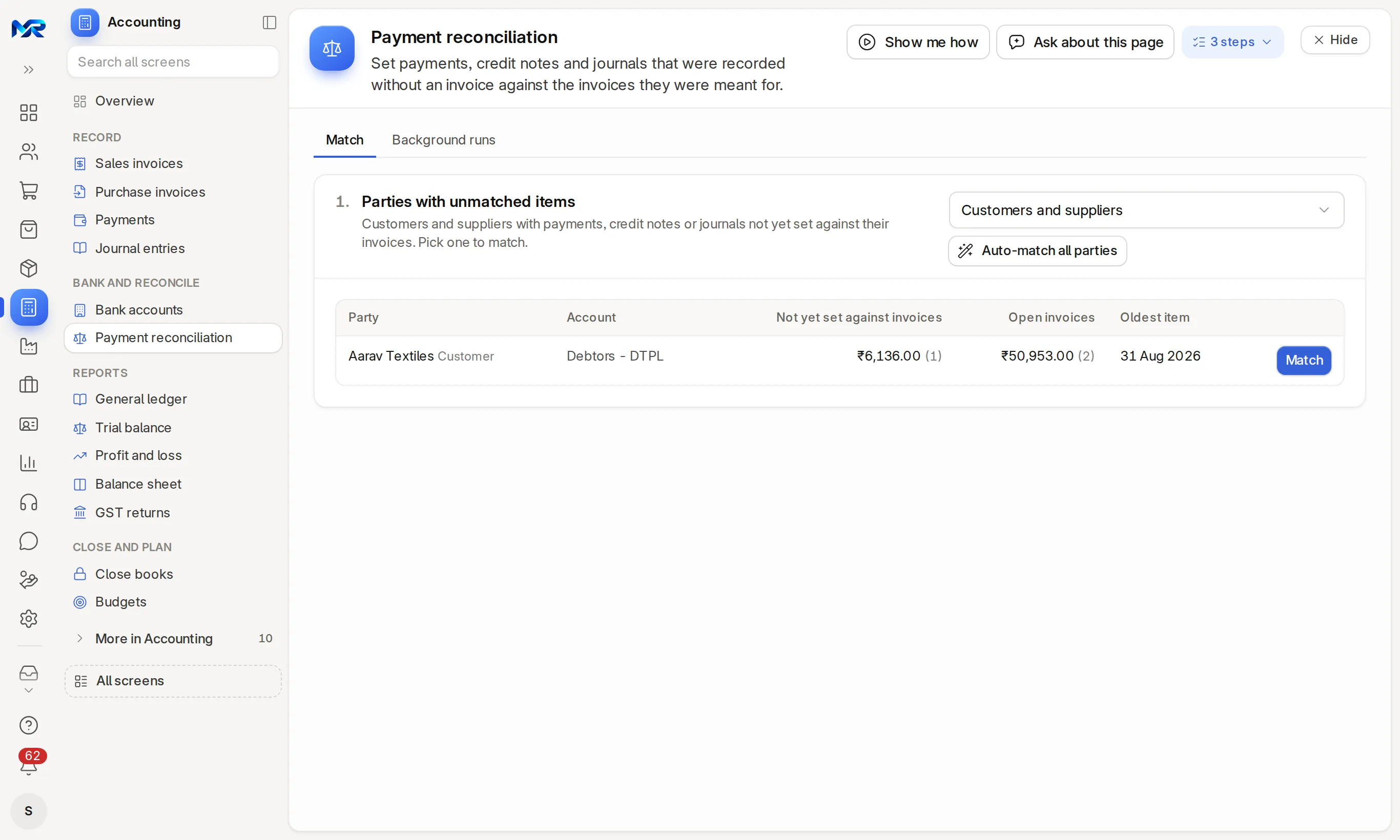
- Pick a party. The page lists every customer and supplier with payments, credit notes or journals not yet set against invoices. Press Match.
- Allocate. Tick the payments and the invoices they pay, then Allocate selected (or Allocate all, oldest first).
- Reconcile. Check the amounts and press Reconcile.
Auto-match all parties does every party at once. Reconcile in background handles a party with thousands of entries; progress shows under Background runs.
Currencies, cost centers and budgets
Section titled “Currencies, cost centers and budgets”- Other currenciesInvoices, bills and payments can be in the party’s currency; the books stay in yours. Revalue foreign currency (on Close books) restates open balances at the current rate.
- Cost centersTrack income and costs by department, branch or project; Profit and loss filters by cost center or project.
- BudgetsTabs Budgets, Plan the year, Cost centers, Seasonality and Variance. Set a limit per expense head and cost center; If crossed chooses Warn, Stop or Ignore for orders and expenses.
- Plan the yearA grid from Last year or Last year + %; Save as draft budgets, then submit them. Revise budget changes a submitted one; Copy to next year carries it forward.
India: GST returns
Section titled “India: GST returns”
Invoices take CGST + SGST or IGST by place of supply (Sales). GST returns opens on last month; [ and ] move a month. Its tabs are Summary, GSTR-1, GSTR-3B, GSTR-2B matching, ITC register, e-Invoices, e-Way bills, TDS and Settings.
- Fix what needs attention. On GSTR-1, Need attention lists invoices missing a GSTIN, HSN or place of supply; Fix opens each. Only submitted invoices count.
- Export the files. Export JSON on GSTR-1 and GSTR-3B (or press E). MyRecords prepares the files; you upload them and file on the GST portal.
- Match GSTR-2B. Upload GSTR-2B JSON from the portal: bills show Matched, Mismatched, Missing in 2B or Missing in books. Make bill drafts a missing bill; Email supplier asks for a missing filing.
- Record IMS decisions. Accept, Reject or Keep pending each supplier document, and download the IMS worksheet (CSV) for the portal.
- Check input tax credit. ITC register: eligible, ineligible 17(5), reversed and at-risk ITC per bill.
- Summary: output tax, ITC, Net payable in cash, taxable sales by rate and the Filing calendar for a monthly filer and TDS. QRMP and composition dates are not shown; filing status is not tracked.
- GSTR-3B: checks the GST accounts against the invoices and sets off ITC in the rule 88A order. Interest and late fee are not computed.
- Settings: GST accounts, the GSTIN of each place of business, HSN rules and e-invoice and e-way bill limits.
- Once connected to a GST service provider: fetch GSTR-2B and send IMS actions from MyRecords.
- Several GSTINs: set up one company per GSTIN; returns are prepared per company.
India: e-invoices and e-way bills
Section titled “India: e-invoices and e-way bills”- e-InvoicesIRP JSON creates the e-invoice upload file for one or many invoices; you upload it and Record the IRN on the invoice’s e-Invoice tab. Print with QR prints the signed QR code. Once connected, Generate on portal gets the IRN directly.
- e-Way billsDownload e-way bill JSON on the document, upload it on the e-way bill portal, then Record the number (12 or 14 digits; 14 from 1 January 2027). Transport details (Part B) changes the vehicle. Once connected, the e-way bill is made, extended and cancelled from the document.
- Statutory datesFor accounts roles, the Calendar’s Statutory dates layer shows TDS, GSTR-1, GSTR-3B, PF and ESI, advance tax, quarterly TDS return and GSTR-9 due dates.
India: TDS and MSME
Section titled “India: TDS and MSME”- Set up the supplier. On the supplier’s Tax tab, fill the Tax ID (PAN) and the Tax Withholding Category (for example 194C contractors, 194J professional fees).
- Enter bills as usual. Once the supplier crosses the year’s limit, the bill shows the TDS and the amount to pay.
- Deposit by the 7th. GST returns › TDS: TDS to deposit per TDS account; Pay records the payment, then Record a challan.
- Prepare the quarterly return. Quarterly TDS statement lists every deduction in the return’s layout and flags any without a challan. Download for the RPU (Excel) and prepare the return in the Return Preparation Utility.
TDS your customers deducted: upload Form 26AS (text) or the AIS (CSV) under Match 26AS / AIS with your books. TDS on salaries is in HR. MSME bills against the 45-day rule and the MSME-1 return are in Purchasing.
The financial statements
Section titled “The financial statements”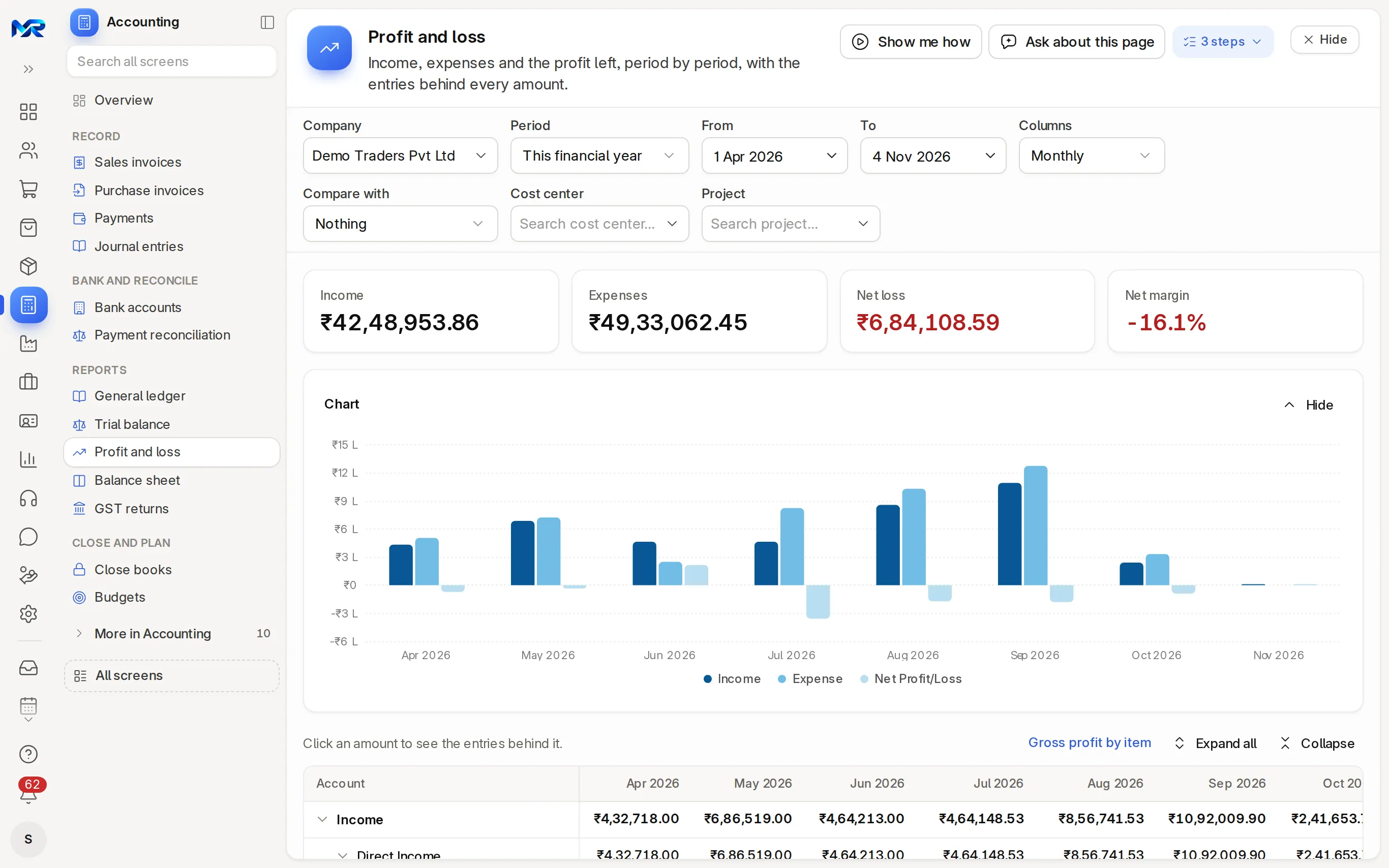
Pick the company and the period (a date for the balance sheet). Click any account or amount for the entries behind it.
- General ledgerEvery posting to an account, party or voucher, with opening, debits, credits, closing and a running balance; Export CSV.
- Trial balanceOpening, debit, credit and closing of every account. Difference must say Balanced; Find the entries that do not balance if not. Print for audit, E-mail the trial balance, Monthly to my CA and Day-wise totals (for your CA).
- Profit and lossMonthly, quarterly, half-yearly or yearly columns; Compare with the previous period or last year; one cost center or project; Gross profit by item.
- Balance sheetWhat the business owns and owes on a date, What the ratios say, Notes to accounts, Pack for the bank and Cash flow. India: also the Schedule III format.
Heavy reports are prepared in the background and show Prepared at with Refresh.
How to check your books
Section titled “How to check your books”- The trial balance says Balanced, and the balance sheet says Balanced.
- Who owes you agrees with the debtors account in the general ledger.
- Bank reconciliation shows a Difference of zero for the month.
Month end and year end
Section titled “Month end and year end”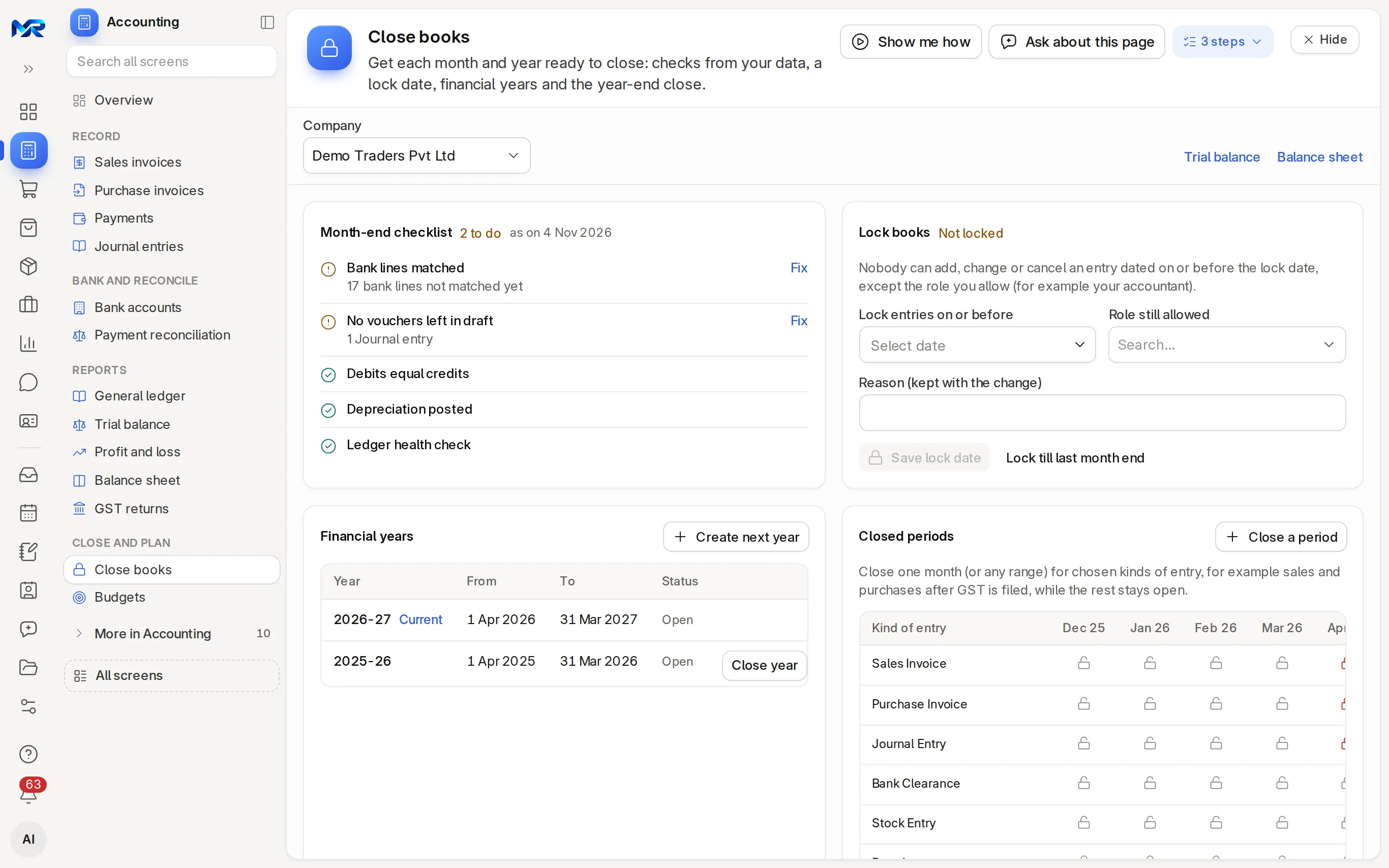
- Work the checklist. Close books › Month-end checklist: bank lines matched, no vouchers left in draft, debits equal credits, depreciation posted, ledger health check. Fix opens what is open.
- Book the extras. Revalue foreign currency and Book deferred revenue and expense, if you use them.
- Lock the books. Lock books up to a date (Lock till last month end, with a reason). Nobody can add, change or cancel an entry on or before it, except the role you allow.
- Close some kinds of entry. Closed periods › Close a period closes chosen kinds (sales and purchases once the tax return is filed, for example) while the rest stays open.
- Close the year. After the audit, Close year under Financial years moves the year’s profit or loss into the equity account you choose. Create next year opens the next one.
Year-end pack on a financial year prints or e-mails its trial balance, profit and loss, balance sheet, notes and closing entries. Invite your CA gives your accountant the Accounts (view only) access pack (or another you pick) that ends on a date you choose: they see the books, GST and reports and change nothing.
With the AI Assistant
Section titled “With the AI Assistant”Each needs the AI Assistant add-on; check what it writes before you use it.
- Explain my monthThe home’s month in a short summary.
- Explain in plain wordsThe balance sheet’s ratios, from the figures on the page.
- Suggest with AINext year’s budget from last year, in Plan the year.
- Read an allotment documentA board resolution (or an Indian PAS-3) into draft share allotments.
- Fill from the guarantee documentA bank guarantee filled from its PDF.
Who sees this
Section titled “Who sees this”- The Accounts access pack (Accounts User, Accounts Manager) owns Accounting; an Auditor also opens it.
- The Accounts (view only) pack, given by Invite your CA, reads everything here and changes nothing.
- Sales people see sales invoices in Sales (a Sales Manager also raises them and reads payments), but not the ledger or the statements without an accounts role. Your menu lists exactly what you may open.
Still stuck?
Ask the team that set it up.
In MyRecords, Show me how walks you through any page. For your plan or a change, write to us.
- Updates and fixes included
- Changes whenever you want