















Lending
From enquiry to sanction letter.
Take the enquiry, appraise with FOIR, LTV and the bureau report, then print the KFS and sanction letter.
10 of 11 parts work today
Follows RBI rules for lenders in India. Outside India, ask us what your regulator needs before you plan. Your country
- Users
- Unlimited
- no per-user fee on any module
- Runs on
- Your server
- or a dedicated system on MyRecords Cloud
- Core ready in
- 1–2 weeks
- set up by our team with the modules you pick
How it works
Seven steps, start to finish.
In short
Loan applications in MyRecords take a borrower from first enquiry to sanction: enquiries with an instalment check and a one-time code to verify, applications on a board by stage, FOIR, LTV and EMI worked out from what you enter, a bureau tab with score, report and consent, a duplicate-borrower check, and a decision log. Once approved, it prints the Key Facts Statement with the loan's cost figures and APR, and the sanction letter, as PDFs, and the KFS can print in the borrower's language under the English. Your credit policy and RBI compliance stay with you as the lender.
-
Step 1
Take the enquiry
Record a walk-in or call, or let applicants use your public enquiry form. Check the instalment against income, verify the mobile or e-mail with a one-time code, then Convert to application.
-
Step 2
Take the application
Pick an existing customer or employee, or type a new applicant; choose the loan product, amount and tenure. The EMI and total interest are worked out for you.
-
Step 3
Appraise
Enter monthly income, existing EMIs and the security value. FOIR and LTV are worked out; upload KYC and income documents against the product's checklist.
-
Step 4
Check the bureau
Record the bureau name, score and report, with the borrower's consent and when it was given, and the CKYC number.
-
Step 5
Decide
Approve, or Reject with a reason, on the application. Every step goes into the decision log.
-
Step 6
Send the KFS
Print or e-mail the KFS, in English or with one of 12 Indian languages under it, and record when the borrower acknowledged it.
-
Step 7
Sanction and disburse
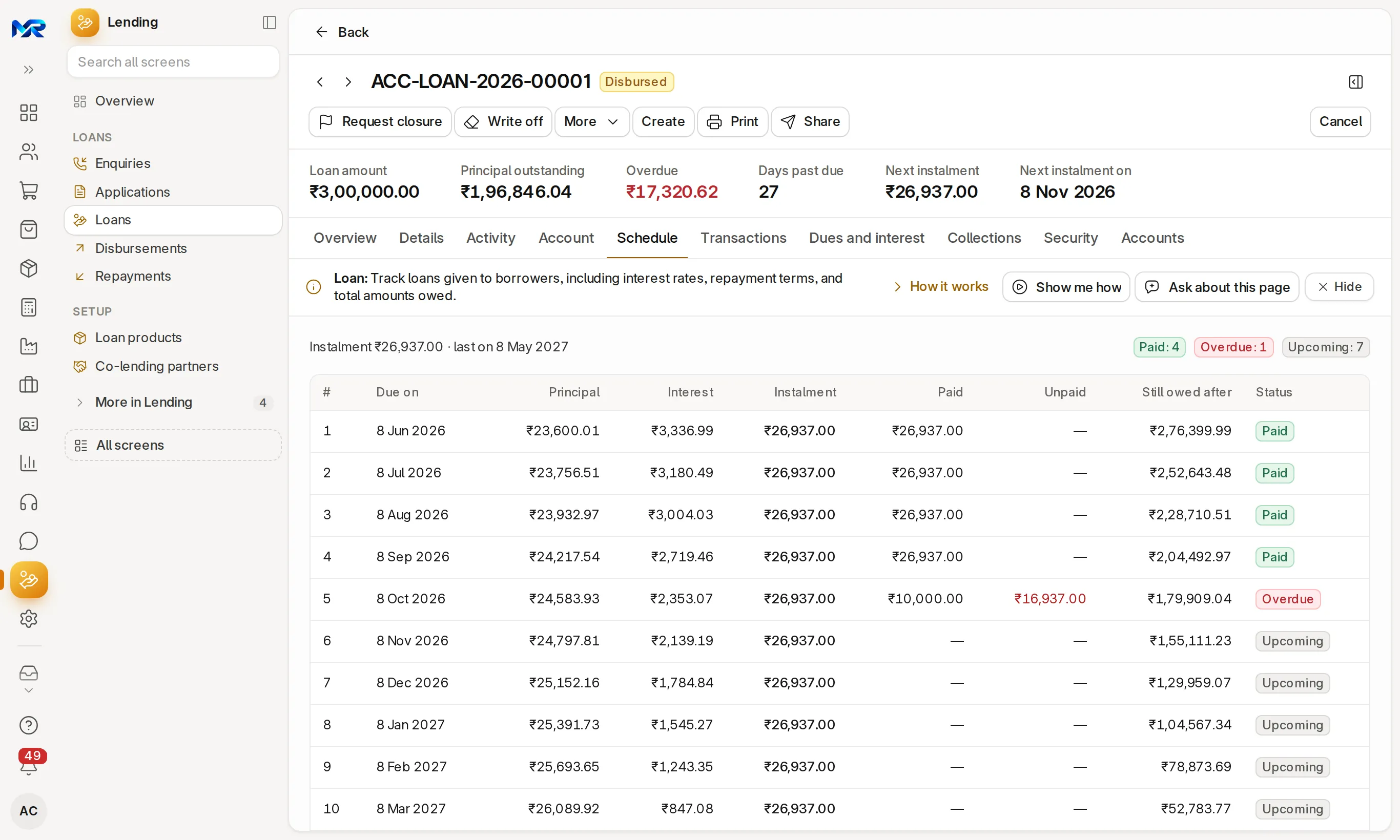
Print the sanction letter, then Make the loan and Pay out. The repayment schedule is made from the same figures.
The details
What it covers.
10 of 11 work today
- Works today 10
- In part 1
-
EnquiriesWorks today
An Assessment tab shows the monthly instalment, instalment ÷ income, age, a PAN format check, the same person elsewhere and a likely-to-convert figure from your past enquiries. A one-time code goes by e-mail, or by SMS once an SMS account is connected.
-
Public enquiry formWorks today
Off until you switch it on. Share the link, a QR code or a WhatsApp message; each enquiry lands in Enquiries. Each device can send 5 an hour, each mobile number once a day.
-
Fill from a photo or by voiceWorks today
With AI Assistant on, a PAN, Aadhaar or salary-slip photo fills the name, PAN, date of birth and income. Aadhaar photos are deleted after reading and only the last 4 digits show. Speak the details in Chrome or Edge.
-
Appraisal and eligibilityWorks today
The Appraisal tab checks the product limit, security cover, contact details, documents, the applicant's other loans with you and other open applications, and previews the instalments.
-
FOIR and LTVWorks today
FOIR is existing EMIs plus this loan's EMI over monthly income; LTV is the loan over the security value, or over the proposed pledges. Shown green up to 50% FOIR and 75% LTV, amber just above and red beyond.
-
Board by stageWorks today
Applications show as a board with one lane per stage of your approval workflow, or by status when you have none.
-
Duplicate-borrower checkWorks today
A banner shows other applications and customers with the same phone, e-mail, CKYC number or name, before you approve.
-
Key Facts StatementWorks today
Amount, term, instalments, interest rate, total interest, fees from the loan product's charges, net disbursed, total payable and the APR from the cash flows, as in RBI's KFS circular of 15 Apr 2024. The sanction letter PDF carries the same figures.
-
KFS in the borrower's languageWorks today
Hindi, Bengali, Marathi, Telugu, Tamil, Gujarati, Kannada, Malayalam, Odia, Punjabi, Assamese or Urdu, line by line under the English, with "English version prevails". The fixed wording is AI-translated once per language and a Loan Manager can correct it; names and figures never go to the AI. Needs AI Assistant on, otherwise the KFS prints in English and says why.
-
Decision logWorks today
Status and workflow changes, decision comments, amendments and KFS events, oldest first, with who and when.
-
Bureau report by APIIn part
Pulling the report from a credit bureau needs your bureau agreement and is not connected yet. Attach the report you download to the application.
Said plainly
Not there yet
- Credit bureau pull by API (attach the report for now).
- KFS acknowledgement on WhatsApp; e-mail acknowledgement works today.
- The rest of RBI's KFS format (recovery, grievance and cooling-off details) is not printed yet; the KFS carries the cost figures and APR.
Official sources
Questions
Questions people ask
Something else on your mind?
Ask us anything about it. A person from our team replies.
Ask a question01How does it work out the APR on the KFS?
From the loan's cash flows, as in the illustration attached to RBI's KFS circular. The figures used (amount, fees, net disbursed and instalments) are printed on the KFS.
02Can we use our own approval steps?
Yes. Set an approval workflow with your stages and who may move each one. The board shows one lane per stage.
03Which languages can the KFS print in?
Hindi, Bengali, Marathi, Telugu, Tamil, Gujarati, Kannada, Malayalam, Odia, Punjabi, Assamese and Urdu, always with the English. The English version prevails.
04Does the software decide whether to lend?
No. It works out FOIR, LTV and EMI and keeps the bureau facts in one place. The 50% and 75% marks only colour the figures; the credit decision, and your RBI compliance, stay with your team.
05Is the bureau report pulled automatically?
Not yet. Pulling a report by API needs your agreement with a credit bureau and is not connected. Record the score and attach the report you download; consent and its time are kept with it.
06Is Loan applications a separate module?
Yes. Lending runs loans, payouts and repayments; Loan applications adds enquiries and the application flow on top, and is switched on and priced on its own.
Last updated Facts last verified against the official sources below Applies to MyRecords 3 Nov 2026 release Expert review pending
Next step
See it on your own numbers.
A live demo on our sample company, with our team. Or ask us for a quote first.
Live demo
Book a walk-through
- On our sample company, for your kind of work
- A quote for the modules you need
- Your questions, answered by our team