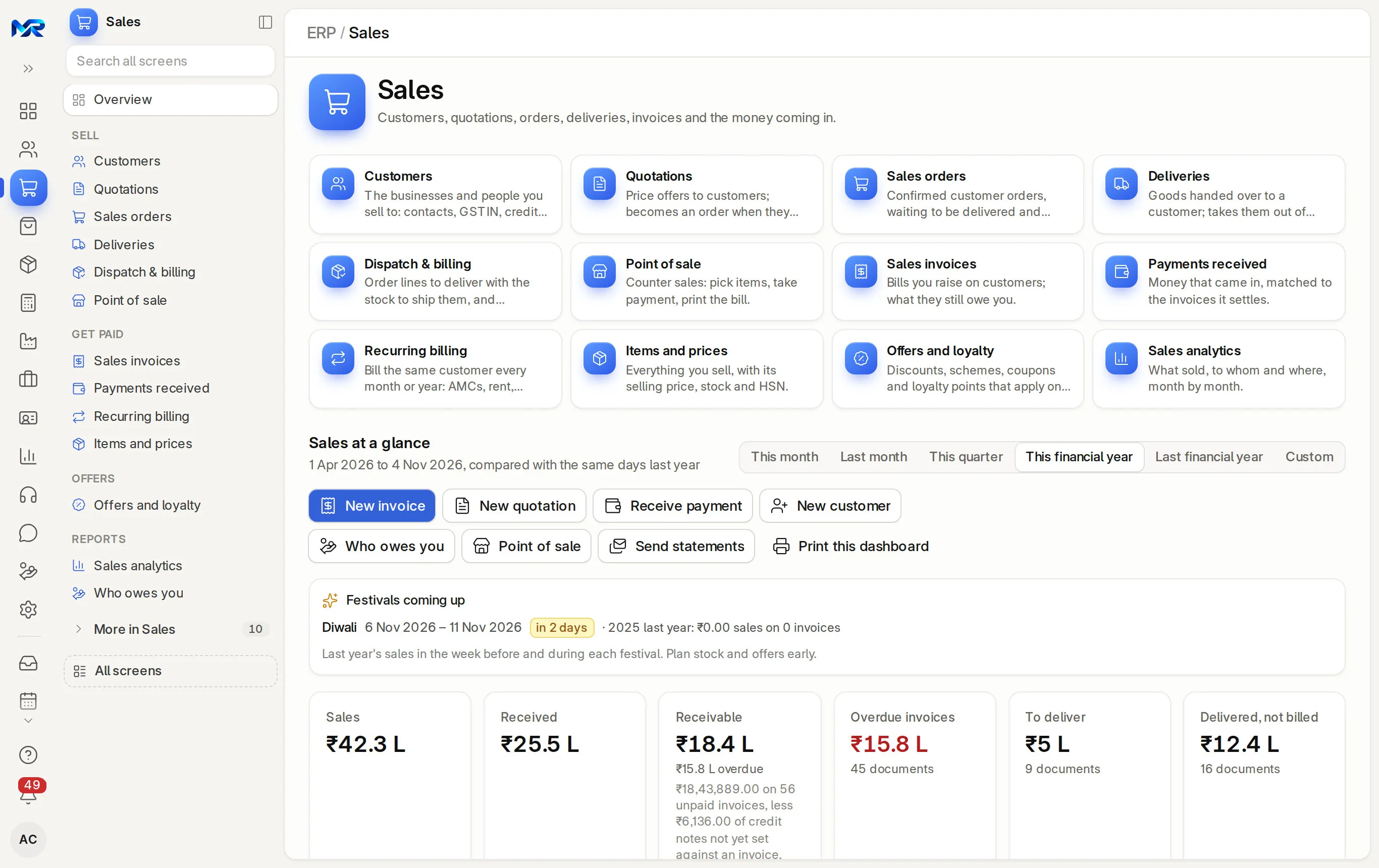
Sales is the order-to-cash work area of MyRecords: customers, quotations, sales orders, deliveries, sales invoices (GST tax invoices in India), payments received and "Who owes you". Each step is made from the one before it, so the lines, prices and taxes carry forward; a delivery moves stock out of the warehouse and an invoice posts to the books when it is submitted. It is part of the ERP core, with unlimited users.
The usual troubleWith Sales
01Before: Orders come in on WhatsApp and nobody knows what is still to deliver.
With Sales: Each order's Fulfilment tab shows, line by line, what is ordered, delivered, still to deliver and in stock.
02Before: The invoice is re-typed from the delivery challan.
With Sales: “Get items from” builds the invoice from the customer's open orders, deliveries, quotations or unbilled timesheets.
03Before: Quotations go out and nobody follows up.
With Sales: Each quotation has a valid-till date and a next follow-up date that reminds you that morning; tabs list those expiring in 7 days, won and lost.
04Before: Collections depend on someone remembering to call.
With Sales: “Who owes you” ages every customer, sends reminders and statements, and marks each promise to pay kept or broken.
What it does
What Sales does for you.
Everything here works today on the demo company.
01
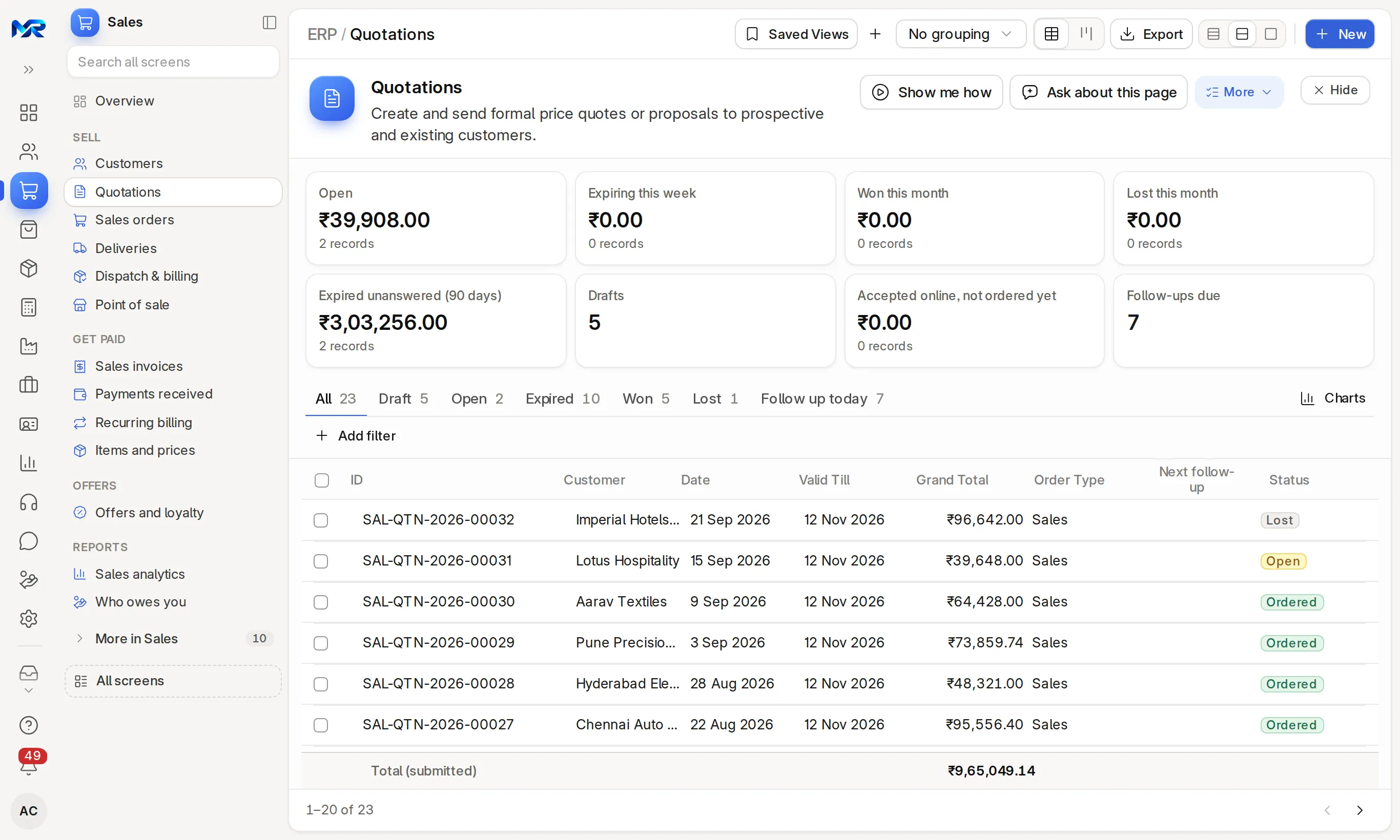
Quotations
Prices from your price list, a valid-till date and the status Open, Ordered, Lost or Expired. Quote check shows each line's discount and the rate this customer last paid, and the margin to managers; Win chance rates the odds from your past quotations. Create revision, Set follow-up, Mark lost with the reason, and Extend validity in bulk. Customers can accept online from the share link once you switch it on.
MyRecords
Quotations on the sample company.
02
Sales orders
Delivery dates per line or a delivery schedule, per cent delivered and billed, Receive advance, Request payment and Reserve stock. The Plan tab flags lines likely to go late. Hold or close many orders at once. Blanket orders hold a year's quantity, called off in parts.
03
Deliveries and dispatch
A delivery note moves stock out of the warehouse. Add the transporter, vehicle and LR numbers, the e-way bill, and proof of delivery with who received it, when, a photo and a signature. Dispatch & billing makes delivery notes and invoices for many orders at once.
The default print is a GST tax invoice with HSN codes, the customer's GSTIN and place of supply. A credit note comes from the invoice for all of it, some lines or a price correction, with stock taken back where goods came back. PDFs of many invoices download in one zip.
05
UPI QR on bills
An amount-coded UPI QR from your own UPI ID on invoices, the proforma print and order advances; the customer pays from any UPI app. Payment links and gateway QRs that record the payment for you work once you connect Razorpay, Cashfree or Stripe.
06
Payments received
Record a payment against one or many invoices, with TDS deducted by the customer, bank charges or a write-off. Money with no invoice yet stays as an advance. Send the receipt by e-mail or WhatsApp, and record a bounced cheque.
Dues per customer, not due to over 120 days, with reminders on WhatsApp or e-mail, reminder letters, statements on a schedule and promises to pay. Someone with only the Sales User role sees just the customers they look after.
08
Recurring billing
Plans for AMCs, rent and retainers bill each customer every cycle in a nightly run, and the At risk tab lists customers paying late. Make recurring repeats a single invoice.
09
Prices, offers and loyalty
Items and prices changes many prices at once and prints item labels with barcodes. Offers and loyalty holds discounts, slab schemes, coupons and loyalty points that apply by themselves on every bill; its Checks tab flags clashing offers and discounts typed by hand. Contracts and partners keeps customer contracts and rate contracts with their renewals, and the dealers who sell for you with their commission.
10
Sales home and analytics
The Sales home shows the period's figures against last year, Suggested today, Festivals coming up and the work lists. Sales analytics splits sales by customer, item, territory and more, week to year, with salesperson targets, the quote-to-cash funnel and lost reasons.
India compliance
For businesses in India, built in.
India is our first fully supported market. Each line says whether it works today, once you connect your account, or in part.
Outside India
Outside India, quotation to payment works the same in your own currency, and your country pack sets the local tax lines and the tax invoice layout; we build and test it before go-live.
Quotations, orders, deliveries, invoices and counter bills carry the GST type their place of supply needs, CGST + SGST or IGST, so the invoice never surprises the customer.
Works today
02
Proforma with GST and UPI
Quotations and orders print as a Proforma Invoice (GST) with both GSTINs, HSN, the tax split, your bank account and a UPI QR for the total.
Works today
03
MRP check
Items and selling lines can carry an MRP, and MyRecords checks that nothing is sold above it including tax, as the Legal Metrology (Packaged Commodities) Rules require.
Works today
04
E-way bill on the delivery
The delivery's e-Way bill tab checks what the portal needs and makes the upload file; you record the number the portal gives back. See e-way bill.
Works today
05
Lakh and crore
Amounts in ₹ with Indian grouping, amount in words on every print, and an April–March year in every report.
Works today
Try it
See it work on sample data.
We show you the live system on a call: one order followed from quotation to payment, with the "How work flows" strip on the Sales home counting every step. Ask for a demo sign-in to explore it yourself, or join the pilot programme and run it on your own customers.
Paste a customer’s WhatsApp or e-mail, or photograph their list or PO. Lines are matched to your items and a draft quotation or order is made for you to check.
Draft it (AI)
A follow-up for a quotation, worded from its own numbers. On the Sales home, “Write the brief” sums up the period.
Ask about this page
On every list, form and report: what is on it in a few points, and a next step.
AI needs the AI Assistant add-on (and an AI key on your own server). It is switched on per role, changes nothing without your yes, and MyRecords works fully with AI switched off.
Chat in Sales
Records as cards
Share any Sales record into a channel as a card. Opening it still follows each person’s access.
A message becomes work
Turn a message into a to-do or task, with a link to it under the message.
Reports come ready on day one. Each person sees only the screens and records their role allows.
Reports you get
Who owes you, and Money due from customers
Sales analytics, with quote to cash and lost reasons
Sales invoice register and Item-wise sales history
Sales gross profit
Lost sales quotations and Quotation trends
Sales order analysis and Delayed sales orders
Unbilled delivered items
Salesperson item target variance and commission summaries
Payment speed and statements
Inactive customers
Who sees what
OOwner
See every order, invoice, margin and due.
SMSales manager
Quote, take orders, deliver and raise invoices; see margins, the whole team's dues and a daily sales digest by e-mail.
SSSales staff
Quote, take orders and arrange deliveries; read, print and e-mail invoices. With only the Sales User role, Who owes you lists just their own customers and margins stay hidden.
AAccountant
Make invoices and credit notes, record payments, and send reminders and statements.
Said plainly, so you can plan around it. What comes next is on the roadmap.
Works today15
On the demo company, now.
Quotations
Sales orders
Deliveries and dispatch
Sales invoices and credit notes
UPI QR on bills
Payments received
Who owes you
Recurring billing
Prices, offers and loyalty
Sales home and analytics
GST from the first quotation
Proforma with GST and UPI
MRP check
E-way bill on the delivery
Lakh and crore
Not in Sales yet
Left out on purpose, or planned.
Online store and marketplace connectors (Shopify, Amazon and others).
Booking couriers through their systems. A shipment's booking and tracking number are entered by hand.
A separate phone app; the browser version installs to the home screen instead.
On a phone
Works in any phone browser and installs to the home screen, so a sales person can quote from a customer's shop. Sales needs a connection; counter billing in Point of sale keeps going when the network drops.
Bringing data in
Customers, items and price lists from our Excel templates through Import data, which checks the columns first; an import that created new records can be undone. Customers can also come from Tally masters. Opening dues come in with the opening balances.
Getting data out
Every list and report to Excel, CSV or PDF; invoices as PDFs one by one or zipped in bulk.
Integrations
UPI QR works today with your UPI ID. Razorpay, Cashfree and Stripe payment links and WhatsApp Business messages are built and work once you connect your own account. Until then Share on WhatsApp opens WhatsApp on your phone with the link ready to send.
Where it runs
Runs as your own dedicated system: on your server under an AMC, or on MyRecords Cloud for a monthly fee. Your customer list and prices stay yours, with a full export when you leave. Data ownership and exit
Questions
Questions people ask
Something else on your mind?
Ask us anything about modules, a quote or moving across. A person from our team replies.
01Can I make an invoice straight from a sales order?
Yes. "Create invoice" on the order's Fulfilment tab, or "Get items from" on a draft invoice, brings in the order's lines, prices and taxes. You can also invoice from a delivery or a quotation.
02Does a delivery reduce stock?
Yes. Submitting a delivery note moves the quantity out of the warehouse it ships from, and the order shows it as delivered.
03Can customers pay by UPI?
Yes. Invoices and open orders show a UPI QR for the exact amount, made from your own UPI ID. Payment links work once you connect a Razorpay, Cashfree or Stripe account; a paid link becomes a payment against the invoice, as a draft to check unless you choose to post it straight away.
04Will my sales staff see our margins?
Only if their role allows it. Cost and margin show to sales, accounts and stock managers and the owner, and you can hide profit from any role. With only the Sales User role, staff see their own customers' dues and no margins.
05Can I send quotations on WhatsApp?
Yes. Share on WhatsApp opens WhatsApp with the quotation link ready to send. Sending from MyRecords through WhatsApp Business works once you connect your account.
06Does it handle credit notes and returns?
Yes. Make a credit note from the invoice for all of it, some lines or a price correction, with the GST reason. Goods that come back go back into stock, and the GST return picks the note up.
07What does AI do in Sales?
With AI Assistant on, it drafts a quotation or sales order from a customer's WhatsApp, e-mail or a photo of their purchase order; writes a quotation's follow-up and sorts its lost reason; words an order's status for the customer; reads a signed challan photo into the proof of delivery; writes item descriptions and suggests HSN codes from the official list; turns "10% off for Diwali" into a draft offer; drafts renewal messages; explains a contract or a rate contract; and writes the brief on the Sales home. Each is a draft you check. AI needs the AI Assistant add-on, and an AI key on your own server.
08Is there a limit on users or invoices?
Users are unlimited, and there is no per-invoice charge. You pay for the modules you switch on, at a setup price set by your business size, which counts documents a month (small up to 3,000, medium up to 30,000).
Last updated Applies to MyRecords 3 Nov 2026 release
Next step
See it on your own numbers.
A live demo on our sample company, with the modules you would switch on. Or ask us for a quote first.