














HR
Your people and their month, in one place.
Attendance, leave, expenses, hiring and appraisals, with My HR on every phone. Attendance and leave feed payroll.
- Works today on the demo company
- Live demo sign-in from us, on request
- Your server or MyRecords Cloud

- Built for you
- Customised
- to your requirements, by our team
- Users
- Unlimited
- no per-user fees, on any module
- Runs on
- Your server or MyRecords Cloud
- a dedicated system, in any country
What it fixes
What changes with HR.
In short
HR is the people side of MyRecords: the employee directory, daily attendance and the month's muster, shifts, leave, expense claims, hiring, appraisals and grievances. Every employee also gets My HR, one page on the phone to check in, apply for leave, claim expenses and open payslips. Requests land in one approvals inbox, and attendance and leave feed the pay run in Payroll.
-
Before: Attendance lives in a register and leave lives in WhatsApp messages.
With HR: A daily attendance board and a month muster, with leave applied and approved in the same place.
-
Before: Every leave request arrives as a phone call.
With HR: Employees apply from My HR. The manager approves from one inbox, with the balance after the leave shown.
-
Before: Expense bills go missing and nobody knows what was paid.
With HR: Each claim line carries the bill photo, the approver's decision and the payment. Many approved claims are paid in one go.
-
Before: Hiring sits in one person's e-mail.
With HR: Openings, applicants, interviews and offers on one board. The new joiner becomes an employee with one action.
What it does
What HR does for you.
Everything here works today on the demo company, except where a tag says it needs your account or works in part.
- 01
Employees, joining to exit
Personal, job, salary and bank details, the Employees directory with an org chart and Fix profiles, and each person's onboarding, moves, exit checklist and full and final statement. Bank details, PAN, Aadhaar, UAN and passport are encrypted when stored; IFSC, UAN and ESIC IP numbers are checked as they are typed.
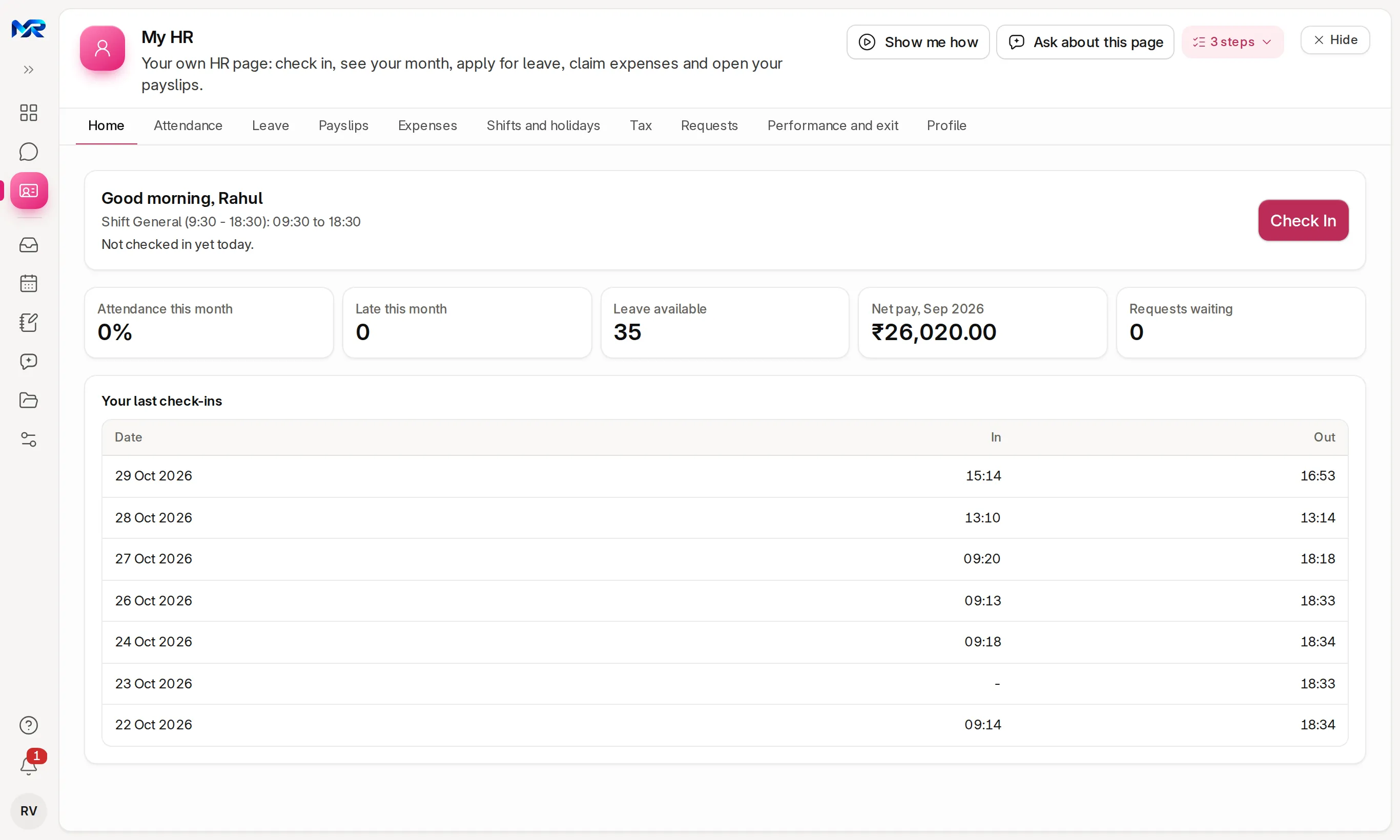
My HR for one employee of the sample company. - 02
Attendance and shifts
Today's board (in, late, out, missing OUT), the month muster, trends, exceptions, check-ins, requests and the shift roster. Once a month's pay run is submitted, only an HR Manager can change its days, with a reason.
- 03
Leave
Leave balances by leave type, and Who's on leave, a team calendar with holidays. An application shows the days, the balance after the leave and who else is off before anyone approves.
- 04
My HR on the phone
Every employee checks in, applies for leave, claims expenses, opens payslips and submits tax declarations. My HR acts only on the signed-in person's own record.
- 05
Expense claims and advances
A bill photo per line, a sanctioned amount per line, advances to adjust, and one page to pay many approved claims at once.
- 06
One approvals inbox
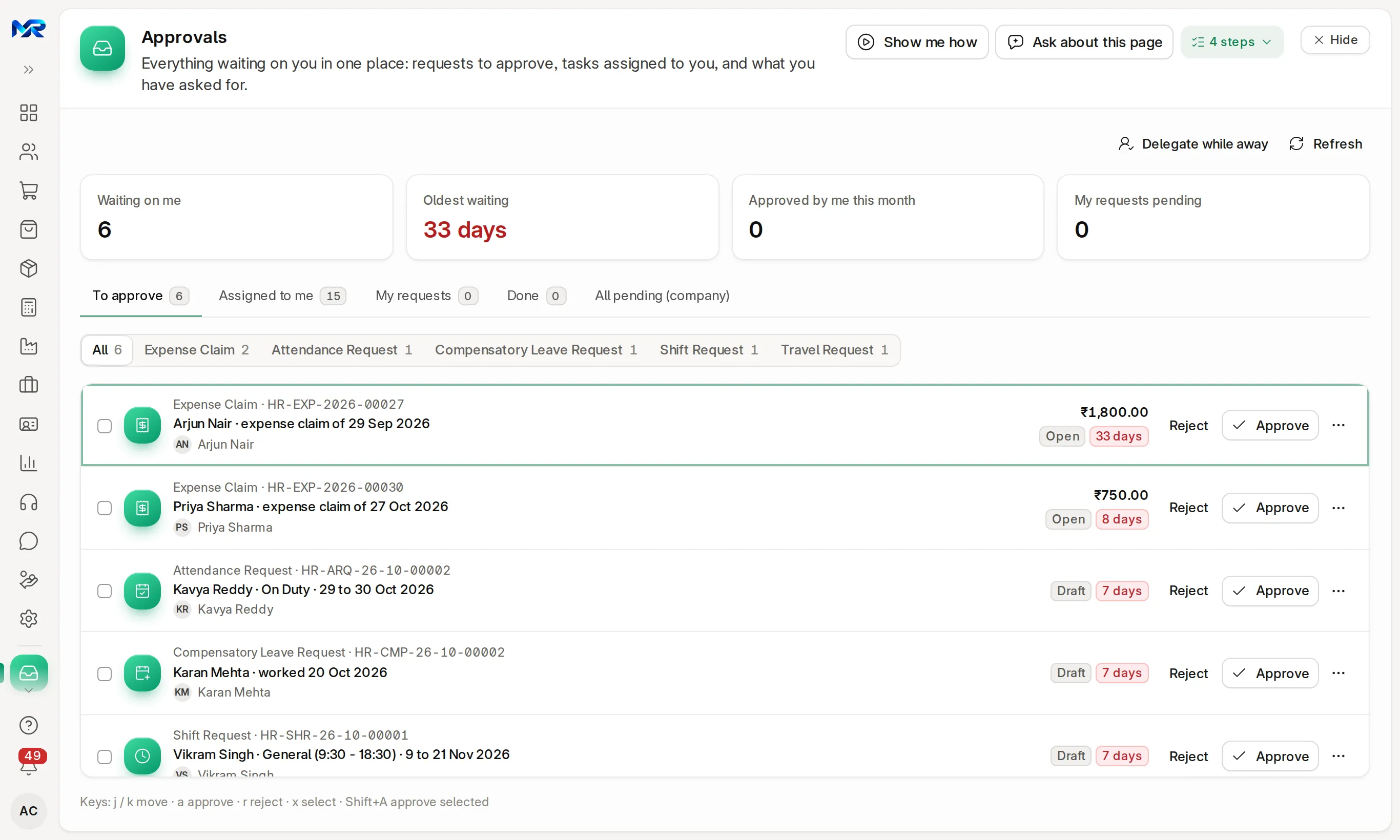
Leave, expense, attendance, shift, comp-off, advance, travel and leave encashment requests in Approvals. Decide one by one or in bulk, and delegate while you are away.
- 07
Hiring, appraisals and training
Job openings, an applicant board, interview rounds with feedback, an offer letter as PDF and the joiner made an employee. Appraisal cycles with self review, feedback, the final review and a 9-box grid. Training sessions with certificates.
- 08
Grievances and POSH
An employee can raise a grievance without their name on it; only the Grievance Officer can see who raised it, with a reason that is logged. A POSH case goes to the Internal Committee alone, with an inquiry clock.
- 09
AI help
Words Brief me on the HR home, reads a bill photo into a claim line and a photo of a paper attendance register, reads a spoken expense line (Read with AI), reads attendance questions the rules cannot, sorts regularisation requests (Classify with AI), words the late pattern, explains the month's spending, and drafts job descriptions, applicant fit notes, interview briefs and final reviews. Nothing is saved until a person accepts it. With the AI Assistant add-on.
- 10 Once connected
Biometric devices
A push address for the sync tools of common biometric devices, with a test punch that never counts. Works once your device is set to send to it; the device's punch file can be imported today.
India compliance
For businesses in India, built in.
India is our first fully supported market. Each line says whether it works today, once you connect your account, or in part.
Outside India
Outside India, attendance, leave, expenses, hiring and appraisals work as described above. The ID checks and registers in this list are for India.
What works in your country- Works today
Holiday lists
National and state holidays added in one step, a list copied to next year with the festivals moved, and an Indian festival overlay on the leave calendar.
- Works today
Indian IDs, checked and protected
PAN, Aadhaar, UAN, ESIC IP number and IFSC are checked for format when typed. PAN, Aadhaar, UAN, passport and bank details are encrypted at rest.
- Works today
Sandwich rule and staffing
Choose per leave type whether holidays between leave days count, and set a department's minimum staffing for the leave calendar.
- In part
Wage and muster registers
The Code on Wages registers (Forms I, IV and IX, and the Form V wage slip) and the older Forms A–E, as PDF to print or Excel. State rules mostly use the same formats; verify yours with your CA.
Try it
See it work on sample data.
We show you the live system on a call, signed in as the demo company's HR manager: today's attendance board, the leave calendar and the approvals inbox. Ask for a demo sign-in to explore it yourself, or join the pilot programme and see it with your own people.
Reports and roles
What you see, and who sees it.
Reports come ready on day one. Each person sees only the screens and records their role allows.
Reports you get
- Muster roll (PDF and Excel)
- Attendance trends, late marks and overtime
- Leave balances by employee and leave type
- Who's on leave (team calendar, PDF)
- Expense claims, unpaid claims and advances
- Spending this month by expense type, person and department
- Headcount, joiners and exits
- Appraisal cycle progress and final scores by manager
- Wage and muster registers
Who sees what
- Owner
- See every HR figure and decide what is routed to them.
- HR manager
- Employees, attendance, leave, expenses, hiring and appraisals for the company; lock a month and change a locked day with a reason.
- Manager
- Approve the requests addressed to them, from Approvals, Who's on leave or My team in My HR.
- Employee
- Only My HR — their own attendance, leave, claims, payslips and tax. They cannot list other employees.
Before you decide
What works today, and what does not.
Said plainly, so you can plan around it. What comes next is on the roadmap.
Works today12
On the demo company, now.
- Employees, joining to exit
- Attendance and shifts
- Leave
- My HR on the phone
- Expense claims and advances
- One approvals inbox
- Hiring, appraisals and training
- Grievances and POSH
- AI help
- Holiday lists
- Indian IDs, checked and protected
- Sandwich rule and staffing
Once you connect1
Built in; needs your own account with the provider.
- Biometric devices
In part1
The feature text says exactly which part.
- Wage and muster registers
Not in HR yet
Left out on purpose, or planned.
- An app from the app stores. My HR works in any phone browser and installs to the home screen.
- Registers and forms of the other three Labour Codes (social security, industrial relations, safety). Only the Code on Wages registers are in.
- Hindi screens. Help, a glossary and Hindi typing are in Hindi; the screens are mostly English.
- On a phone
- Works in any phone browser and installs to the home screen. Attendance check-in keeps working offline: the punch is queued with the phone's time and sent when the connection returns. The rest of HR needs a connection.
- Bringing data in
- Employees from our Excel template, with "Check the columns" first and "Undo this import" for records it created. Salary structures for many employees pasted from a sheet or uploaded as CSV, every row checked first. Punches from a biometric device's file.
- Getting data out
- Every list and report exports to Excel, CSV or PDF. The muster roll and the registers print as PDF. On your own server, the database is yours.
- Integrations
- E-mail reminders and digests work today. Biometric devices push punches once the device's sync tool points at your system. With your WhatsApp Business account connected, staff check in by sending IN or OUT, and reminders, the weekly roster and managers' digests go on WhatsApp. "Brief me" on the HR home works without AI; its AI wording needs the AI Assistant add-on.
- Where it runs
- Runs as your own dedicated system: on your server under an AMC, or on MyRecords Cloud for a monthly fee. Employee records stay in your system, and you can export everything when you leave. Data ownership and exit
Questions
Questions people ask
Something else on your mind?
Ask us anything about modules, a quote or moving across. A person from our team replies.
Ask a question01Can employees check in from their phone?
Yes. My HR has Check In and Check Out. HR can turn on the phone's location with an allowed radius. Without network, the punch is queued with the phone's time and sent later.
02Is there a charge per employee?
No. Users are unlimited on every module. Give every employee a My HR login at no extra cost; you pay only for the modules you switch on.
03Can a manager approve leave from a phone?
Yes. Approvals and My team in My HR work in the phone browser, and on the HR home you can swipe right to approve and left to reject. A leave or expense request can also be approved from its card in Chat.
04Can employees see each other's salary or leave?
Not salaries or leave details. My HR shows only the signed-in person's own record, enforced on the server. If HR switches it on, Who's on leave shows department colleagues as "Leave", without the type or the application.
05Does it work with our biometric machine?
If the device's sync tool can push punches to a web address, yes, once it is set up; a test punch checks the link. Otherwise import the device's punch file. Each employee needs their device ID on their record.
06Can we keep our own leave rules?
Yes. Leave types with their own allocation, half days, the sandwich rule, comp-off for holiday work and leave encashment. Department minimum staffing shows on the leave calendar.
07Do we need Payroll to use HR?
No. HR works on its own. Payroll needs HR, because the pay run reads employees, attendance and leave from it.
Last updated Applies to MyRecords 3 Nov 2026 release
Next step
See it on your own numbers.
A live demo on our sample company, with the modules you would switch on. Or ask us for a quote first.
Live demo
Book a walk-through
- On our sample company, for your kind of work
- A quote for the modules you need
- Your questions, answered by our team