














Manufacturing
From BOM to finished goods, costed.
Plan, issue material, run each operation and book the output, with stock and cost right at every step.
- Works today on the demo company
- Live demo sign-in from us, on request
- Your server or MyRecords Cloud

- Built for you
- Customised
- to your requirements, by our team
- Users
- Unlimited
- no per-user fees, on any module
- Runs on
- Your server or MyRecords Cloud
- a dedicated system, in any country
What it fixes
What changes with Manufacturing.
In short
Manufacturing in MyRecords covers bills of materials, production plans, work orders, job cards and the Shop floor page. A work order takes its materials from the BOM, moves them to work in progress, runs each operation as a job card with time logs, and books the finished goods into stock at their real cost. Quality checks, job work and the books work on the same records.
-
Before: Nobody knows what a product really costs to make.
With Manufacturing: BOMs carry material and operation cost and warn when they are costed at old prices. Each manufacture entry books the actual cost of what was made.
-
Before: Production stops because one material ran short.
With Manufacturing: Plan this order shows what is short before you start, and the Manufacturing home lists what is short in the next 14 days, with Raise material request.
-
Before: Supervisors chase operators to find out what is done.
With Manufacturing: The Shop floor page shows each workstation's queue and live timers; operators start, pause and complete jobs themselves.
-
Before: Machine downtime is never written down.
With Manufacturing: Pause reasons stay on the job card and downtime entries on the workstation, with a warning when stoppages rise. Both show on the production dashboard.
What it does
What Manufacturing does for you.
Everything here works today on the demo company.
- 01
Bills of materials
Multi-level BOMs with operations, by-products and scrap, versions and cost updates. Build a multi-level BOM makes a product's BOM and its sub-assemblies' in one go; BOM explorer shows the tree with the cost of every level. Compare two BOMs, see where one is used, or replace it everywhere. How many can we make? checks stock for any quantity, and Should cost today sets each line against its last purchase rate.
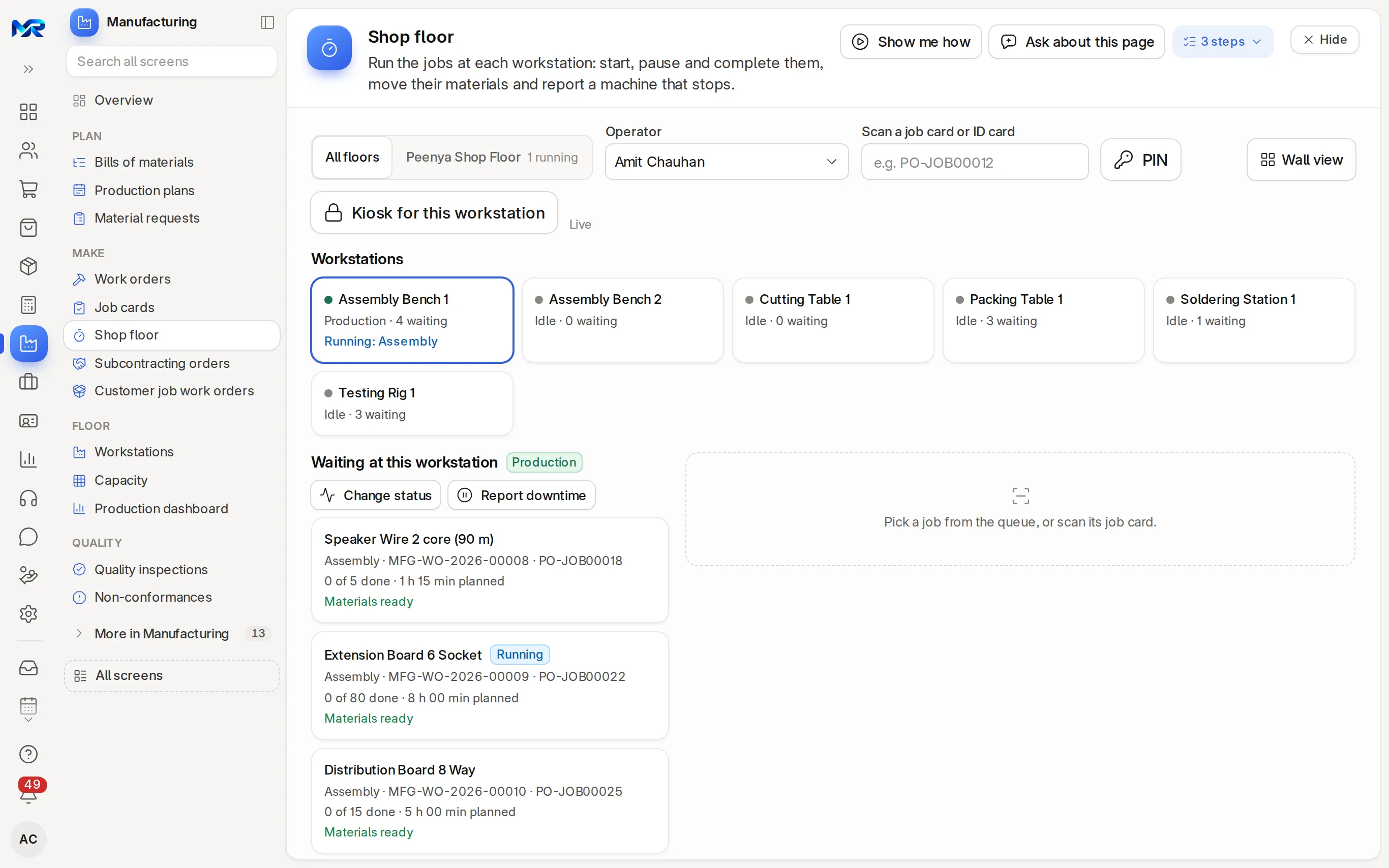
The Shop floor page: every workstation and its queue. - 02
Production plans
Plan from open sales orders, material requests or a sales forecast. The plan makes work orders, purchase orders for job workers and material requests for what is short.
- 03
Work orders and job cards
Materials from the BOM, stock reserved and moved to work in progress, each operation a job card you start, pause, resume and complete.
- 04
Shop floor
Each workstation's queue, timers and PIN sign-in on a shared screen, and a wall view for supervisors. It keeps working when the network drops and syncs later.
- 05
Workstations and capacity
Working hours (or HR shift hours), hour rate, queue, 7-day load and stoppage trend for each workstation, and a Capacity page by day for 7, 14 or 31 days.
- 06
Production dashboard
Output, on time, downtime, labour time, quality, cost variance and subcontracting, by week, month, quarter or year and against the period before, with a next-month output forecast.
- 07
Quality on the line
Inspections from a job card or the Shop floor page, with readings that pass or fail as they are typed. See Quality.
- 08
Job work
Give one operation or a whole item to a job worker and receive it back. See Subcontracting.
- 09
Prints for the floor
Work order traveller, material issue slip, BOM structure and cost, BOM pick sheet and production plan sheet.
- 10
AI help
Read a parts list photo or PDF into a draft BOM, explain why a BOM's cost moved, sum up production in a few lines, and translate job instructions for read-aloud. Needs the AI Assistant add-on; nothing is saved until you confirm.
India compliance
For businesses in India, built in.
India is our first fully supported market. Each line says whether it works today, once you connect your account, or in part.
Outside India
Outside India, manufacturing works the same in your own currency. Job work under section 143 and output by HSN are for India.
What works in your country- Works today
Job work under section 143
Material sent to a job worker goes on a rule 55 challan, and an alert warns before inputs have been out a year.
- Works today
Output by HSN
The production dashboard shows output by HSN code, the same codes your GST returns use.
- In part
BOMs from Tally
BOMs come in from Tally as drafts, with units converted and co-products, by-products and scrap. Tested on Tally's own sample export so far.
Try it
See it on the demo company.
The demo company has BOMs, work orders in every state, job cards and six workstations. We run a work order from BOM to finished goods with you on a call, and can give you a demo sign-in to try it yourself. Or join the pilot programme and try it on your own products.
Reports and roles
What you see, and who sees it.
Reports come ready on day one. Each person sees only the screens and records their role allows.
Reports you get
- Production dashboard
- Production Analytics
- Work Order Summary
- Production Plan Summary
- BOM Stock Analysis (what you can make now)
- BOM Variance Report
- Material Requirements Planning Report
- Job Card Summary
- Downtime Analysis
- Process Loss Report
Who sees what
- Owner
- See every order, cost and margin.
- Manufacturing Manager
- Plan, create and close work orders, change BOMs and see costs.
- Manufacturing User
- Create work orders and job cards, move materials and record output. Costs stay hidden.
- Shop Floor Operator
- Sign in on the Shop floor page with a PIN, run their jobs, report stoppages and type in-process readings. Logs time only for themselves and sees no costs.
- Quality Manager
- Record inspections and follow up non-conformances.
Before you decide
What works today, and what does not.
Said plainly, so you can plan around it. What comes next is on the roadmap.
Works today12
On the demo company, now.
- Bills of materials
- Production plans
- Work orders and job cards
- Shop floor
- Workstations and capacity
- Production dashboard
- Quality on the line
- Job work
- Prints for the floor
- AI help
- Job work under section 143
- Output by HSN
In part1
The feature text says exactly which part.
- BOMs from Tally
Not in Manufacturing yet
Left out on purpose, or planned.
- Direct machine or PLC connections. Quantities are entered from job cards and the Shop floor page.
- A native tablet app. The Shop floor page runs in the browser.
- On a phone
- The Shop floor page keeps working offline: start, pause, resume and complete wait on the device and sync when the network is back. The rest of Manufacturing works in any phone browser with a connection and installs to the home screen.
- Bringing data in
- Items, BOMs and workstations from a spreadsheet on our template; Import data checks the columns first and can undo an import. BOMs from Tally come in as drafts, tested on Tally's own sample export.
- Getting data out
- Every report and list exports to Excel, CSV or PDF. The Production Summary can go out by e-mail on a schedule, and the Manufacturing home can e-mail you the day's production at 7 pm.
- Integrations
- Problem and long-stoppage alerts reach the in-app bell today, and WhatsApp once you connect WhatsApp Business. Machines and PLCs do not connect directly.
- Where it runs
- Runs as your own dedicated system: on your server under an AMC, or on MyRecords Cloud for a monthly fee. The Shop floor page runs in a browser on any PC or tablet on your floor. Data ownership and exit
Questions
Questions people ask
Something else on your mind?
Ask us anything about modules, a quote or moving across. A person from our team replies.
Ask a question01Does the shop floor work without the internet?
Yes. The Shop floor page keeps your start, pause, resume and complete actions on the device and sends them when the network is back. Other manufacturing screens need a connection.
02How is the cost of a finished item worked out?
Materials at their stock value, plus operation time at each workstation's hour rate, plus any extra costs you add. The manufacture entry books that cost to the finished goods.
03Can I make to order?
Yes. Make a work order from a sales order, or plan several orders together in a production plan that makes the work orders and material requests.
04Does it handle multi-level BOMs?
Yes. Build a multi-level BOM makes the BOMs of a product and all its sub-assemblies in one go, and the BOM explorer shows the whole tree with the cost at each level.
05Can I send part of the work to a job worker?
Yes. Use Subcontract this job on a job card, or subcontract a whole item; the material goes out on a challan and comes back as finished goods. See Subcontracting.
06Do I need the manufacturing industry pack?
No. The pack adds a downtime reason on job cards, an approval step for new BOMs and a Manufacturing Floor set of shortcuts. Manufacturing works without it. See Industry packs.
07Can operators use a shared tablet?
Yes. Kiosk for this workstation locks the screen to one workstation, and each operator signs in with a 4-digit PIN.
Last updated Applies to MyRecords 3 Nov 2026 release
Next step
See it on your own numbers.
A live demo on our sample company, with the modules you would switch on. Or ask us for a quote first.
Live demo
Book a walk-through
- On our sample company, for your kind of work
- A quote for the modules you need
- Your questions, answered by our team