















Accounting
Statements your CA can sign off.
Trial balance, profit and loss, cash flow and a Schedule III balance sheet, straight from the books.
All 9 parts work today
- Users
- Unlimited
- no per-user fee on any module
- Runs on
- Your server
- or a dedicated system on MyRecords Cloud
- Core ready in
- 1–2 weeks
- set up by our team with the modules you pick
How it works
Three steps, start to finish.
In short
MyRecords produces the general ledger, trial balance, profit and loss, cash flow and a balance sheet in the Companies Act Schedule III layout, with notes to accounts, from the same books every module posts to. Every figure opens the ledger entries behind it. Big reports run in the background and show when they were prepared, and the books are closed month by month with a lock date so the numbers you report stay put.
-
Step 1
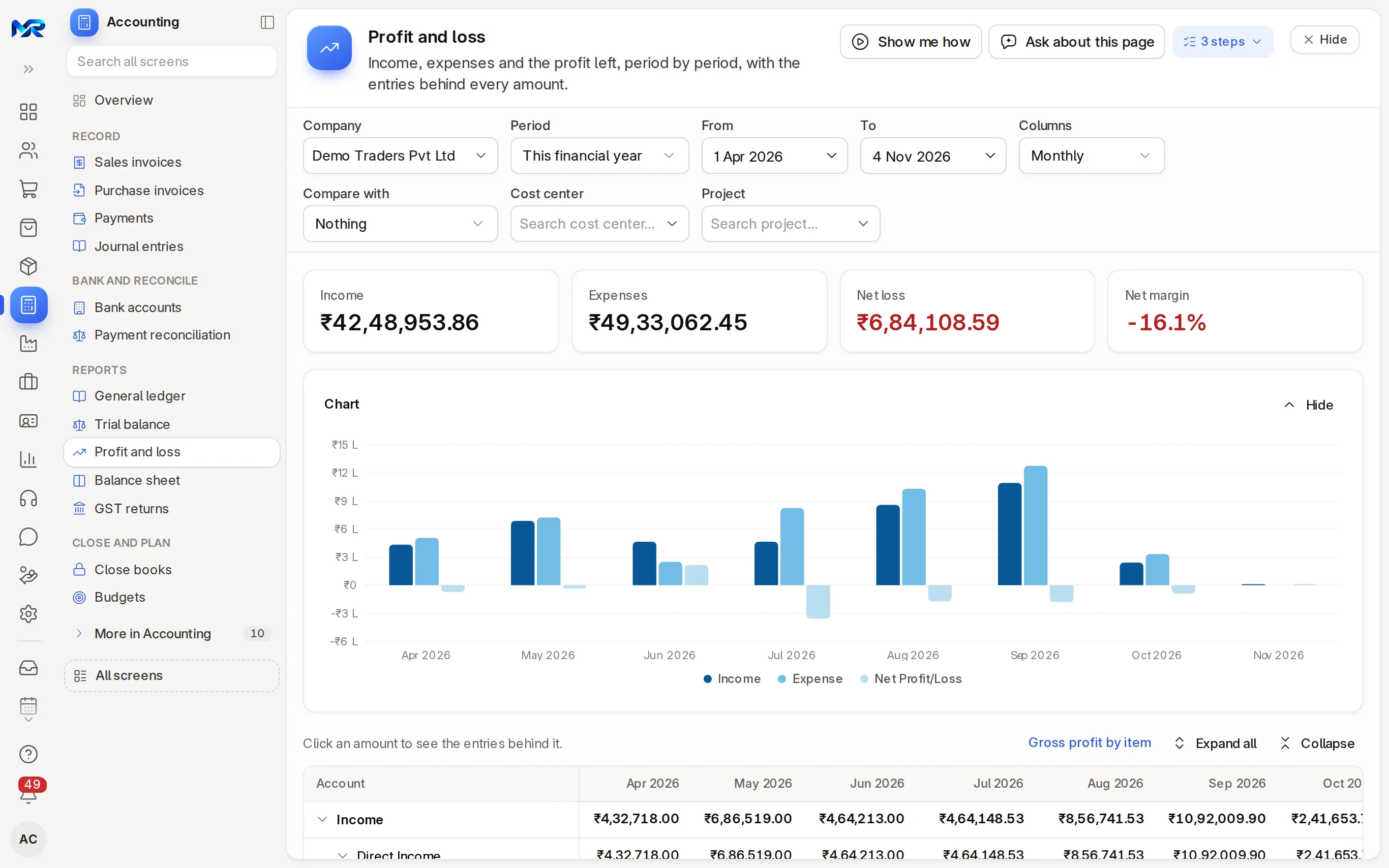
Pick the period
Monthly, quarterly, half-yearly or yearly columns, compared with the period before or the same period last year.
-
Step 2
Drill to the entry
Click any figure to see the ledger lines behind it, and from there the invoice, payment or journal.
-
Step 3
Close and send
Run the month-end checks, lock the period, and print or e-mail the statements to your CA or bank.
The details
What it covers.
9 of 9 work today
- Works today 9
-
Trial balanceWorks today
Every account's opening, movement and closing for the period, with a check that debits equal credits, a previous-year column, and a print for audit with signature lines.
-
Profit and lossWorks today
Income and expenses as a tree, by period, for one cost center or project if you need, each cell opening the ledger behind it. Also in the Schedule III form, with earnings per share.
-
Schedule III balance sheetWorks today
Assets against liabilities and equity in the Schedule III (Division I) order, with ledgers mapped to its heads and notes to accounts grouped by them.
-
Cash flowWorks today
Cash from operating, investing and financing activities for the period, from the same ledger.
-
General ledgerWorks today
Every posting, account by account, with the running balance, a drill to the voucher, party or account, and a CSV export.
-
Prepared in the backgroundWorks today
Large reports run in the background, show "Prepared at" with a Refresh button, and tell you when they are ready.
-
Close the booksWorks today
A month-end checklist (bank lines matched, no drafts, debits equal credits, depreciation posted), a lock date with its history, closed periods, and a year-end close that moves the profit into equity.
-
Ratios in plain wordsWorks today
The balance sheet shows the current ratio and other key ratios. With the AI Assistant add-on, "Explain in plain words" writes what they say, using only the figures on the page.
-
A pack for the bank or CAWorks today
The pack for the bank (balance sheet with notes) and the year-end pack, to print or e-mail. "Monthly to my CA" sends last month's trial balance as a PDF from the 1st.
Said plainly
Not there yet
- Filing financial statements with the MCA; the statements are for you, your CA and your bank.
Questions
Questions people ask
Something else on your mind?
Ask us anything about it. A person from our team replies.
Ask a question01Is the balance sheet in Schedule III format?
Yes. Ledgers are mapped to the Schedule III (Division I) heads, and the balance sheet and notes to accounts follow that order. Your CA can review the mapping on its own screen.
02Do I need to post anything to see the statements?
No. Invoices, payments, stock movements, depreciation and pay runs post as they are submitted, so the statements are up to date whenever you open them.
03Can I stop people changing a closed month?
Yes. Set a lock date under Lock books on the Close books page. Entries dated on or before it are refused, except for the role you allow, and every change is kept with its reason.
04Can my CA get the trial balance every month?
Yes. Press "Monthly to my CA" on the trial balance, enter their e-mail and tick "Send it every month"; it goes as a PDF. Or invite your CA with accounts access until a date you choose.
05Do the reports export to Excel?
Yes. Every report exports to Excel, CSV or PDF.
Last updated Applies to MyRecords 3 Nov 2026 release
Next step
See it on your own numbers.
A live demo on our sample company, with our team. Or ask us for a quote first.
Live demo
Book a walk-through
- On our sample company, for your kind of work
- A quote for the modules you need
- Your questions, answered by our team