















Accounting
Bank reconciliation in minutes, not days.
Import the statement. Each line gets a suggested match; only the leftovers need you.
8 of 9 parts work today
- Users
- Unlimited
- no per-user fee on any module
- Runs on
- Your server
- or a dedicated system on MyRecords Cloud
- Core ready in
- 1–2 weeks
- set up by our team with the modules you pick
How it works
Three steps, start to finish.
In short
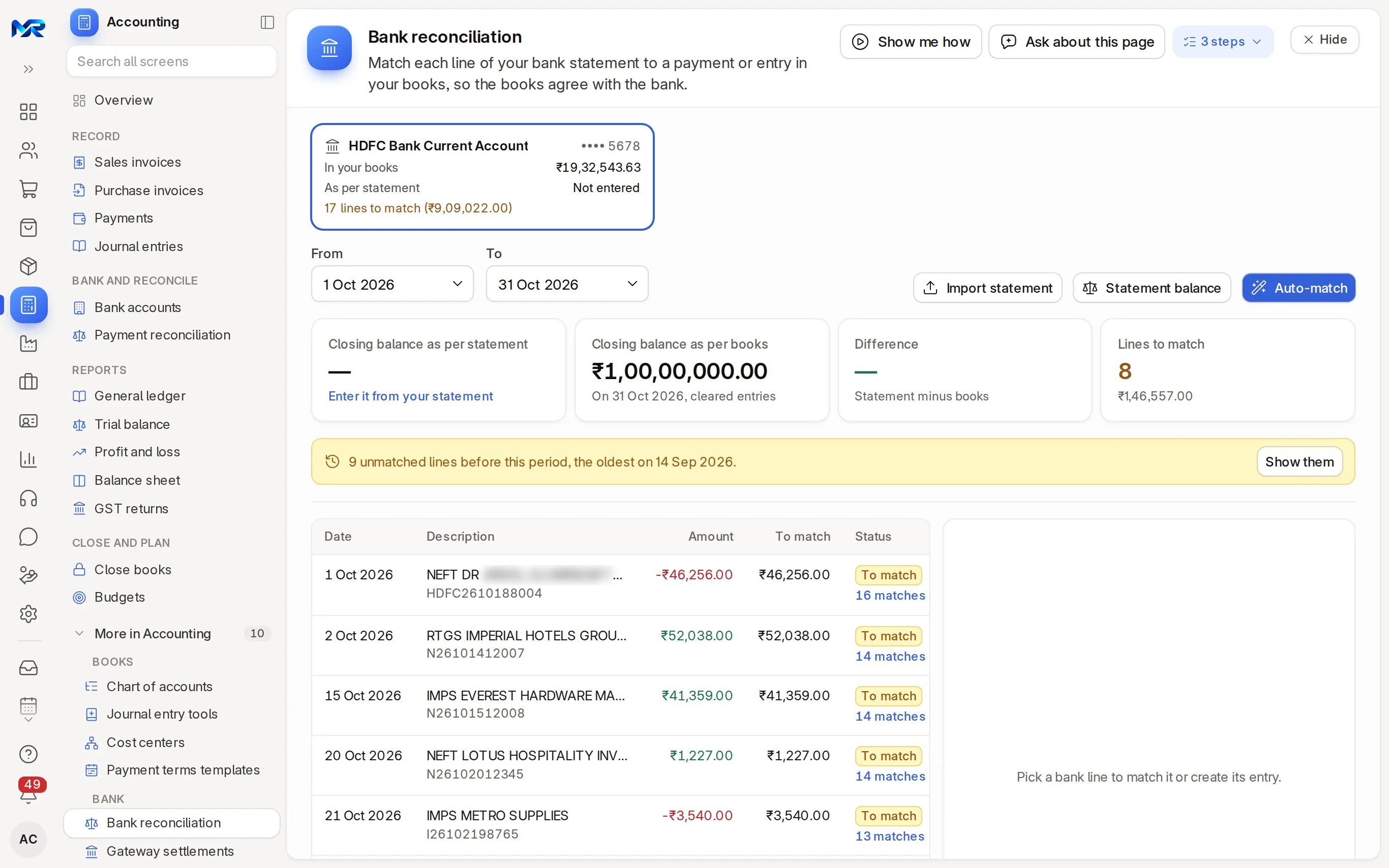
Bank reconciliation in MyRecords takes your bank statement as a CSV or Excel file and lists its lines against your books. For each line it suggests the payment, journal entry or invoice it matches; you tick one and press Match, or create the missing entry from the line. The page shows the closing balance as per statement and as per books, the difference, and the lines still to match. Automatic bank feeds are not available yet.
-
Step 1
Import the statement
On Bank accounts, press Import statement and load the CSV or Excel file. Set your bank's statement columns once, or detect them from a sample statement.
-
Step 2
Auto-match
Pick the account card and the dates, enter the statement balance, and press Auto-match. Every line with a clear match (the same reference, or the same amount near the date) turns Matched.
-
Step 3
Clear the rest
Click a line still to match, tick the suggested payments and press Match. For bank charges or interest, Create and match makes the entry from the line.
The details
What it covers.
8 of 9 work today
- Works today 8
- Once connected 1
-
Match suggestionsWorks today
Every open line shows how many entries in the books could match it, ranked with the same reference, amount and party first.
-
Create from the lineWorks today
A payment from a customer, a payment to a supplier, or bank charges, interest and the like, made from the statement line with the amount and date filled in, and matched at once.
-
Statement and book balancesWorks today
The closing balance as per statement and as per books, the difference between them, and the lines still to match, for the account and dates you pick.
-
Old lines do not hideWorks today
A banner tells you how many lines before the chosen period are still unmatched, and the date of the oldest.
-
Undo a matchWorks today
Unmatch a line that was paired wrongly, or edit a statement line, and match it again. An entry made from the line is cancelled when you unmatch it.
-
Bank accountsWorks today
Each account's balance in your books beside the statement balance, the lines to match, a low-balance alert, and a bank details letter to send to customers.
-
Reports on the pageWorks today
The Reports tab opens the reconciliation statement, the cleared items and the wrongly cleared cheques for the account and dates you picked.
-
Gateway payoutsOnce connected
Razorpay and Cashfree payouts come in with their fees and the GST on the fees, post as one journal, and match the bank line by its UTR.
-
Close the monthWorks today
Once the bank agrees, lock the period so nobody posts into it by mistake.
Try it
See it work on sample data.
A fictional company, played step by step. The live demo has the real screens; ask us for a demo sign-in.
Bank reconciliation
Match each line of your bank statement to a payment or entry in your books, so the books agree with the bank.
Canara Bank Current ···· 4417
From1 Oct 2026To31 Oct 2026
Closing balance as per statement
₹18,47,219.50
Closing balance as per books
₹18,45,613.50
Difference
₹1,606.00
Statement minus books
Lines to match
2
| Date and description | Amount | Status |
|---|---|---|
| NEFT KAVERI AGENCIES INV 0039102 Oct 2026 · N27526100412 | ₹1,15,734.00 | Matched ACC-PAY-2026-00512Kaveri Agencies |
| UPI MYSURU BUILDMART06 Oct 2026 · 627914583310 | ₹23,600.00 | Matched ACC-PAY-2026-00518Mysuru Buildmart |
| NEFT SALARY OCT 202621 Oct 2026 · N29426102133 | -₹3,42,800.00 | Matched ACC-JV-2026-00144Salary, Oct 2026 |
| BANK CHARGES OCT22 Oct 2026 · CHG261022 | -₹236.00 | To match No match: create the entry from the line |
| INTEREST CREDIT SEP QTR25 Oct 2026 · INT261025 | ₹1,842.00 | To match No match: create the entry from the line |
Left for you to review 2 of 5 lines
Fictional sample. Statements come in as CSV or Excel files; no automatic bank feeds yet.
Said plainly
Not there yet
- Automatic bank feeds from your bank or an account aggregator; import the statement file instead.
- Entries booked by themselves from saved rules. A bank rule only labels the lines it recognises ("Rule: Bank charges"); Auto-match works from references, amounts and dates, and you create the rest from the line.
Questions
Questions people ask
Something else on your mind?
Ask us anything about it. A person from our team replies.
Ask a question01Which banks are supported?
Any bank that lets you download a statement as CSV or Excel. You set its statement columns once per bank, or detect them from a sample statement, and later imports use them.
02Is there a direct bank feed?
Not yet. MyRecords does not connect to your bank directly; you import the statement file. Direct feeds are on the roadmap.
03What happens to bank charges and interest?
They usually have no entry in your books, so they stay unmatched. Create and match makes the entry from the statement line; it is submitted and matched at once.
04Can my CA do the reconciliation?
Yes. Invite your CA with accounts access until a date you choose; the access ends by itself. Users are unlimited.
05How is this different from payment reconciliation?
Bank reconciliation matches your bank statement to your books. Payment reconciliation matches payments already in your books to the invoices they settle.
Last updated Applies to MyRecords 3 Nov 2026 release
Next step
See it on your own numbers.
A live demo on our sample company, with our team. Or ask us for a quote first.
Live demo
Book a walk-through
- On our sample company, for your kind of work
- A quote for the modules you need
- Your questions, answered by our team