















Manufacturing
A shop-floor screen that keeps working.
Operators start, pause and complete jobs on a shared screen, even when the network drops.
6 of 7 parts work today
- Users
- Unlimited
- no per-user fee on any module
- Runs on
- Your server
- or a dedicated system on MyRecords Cloud
- Core ready in
- 1–2 weeks
- set up by our team with the modules you pick
How it works
Six steps, start to finish.
In short
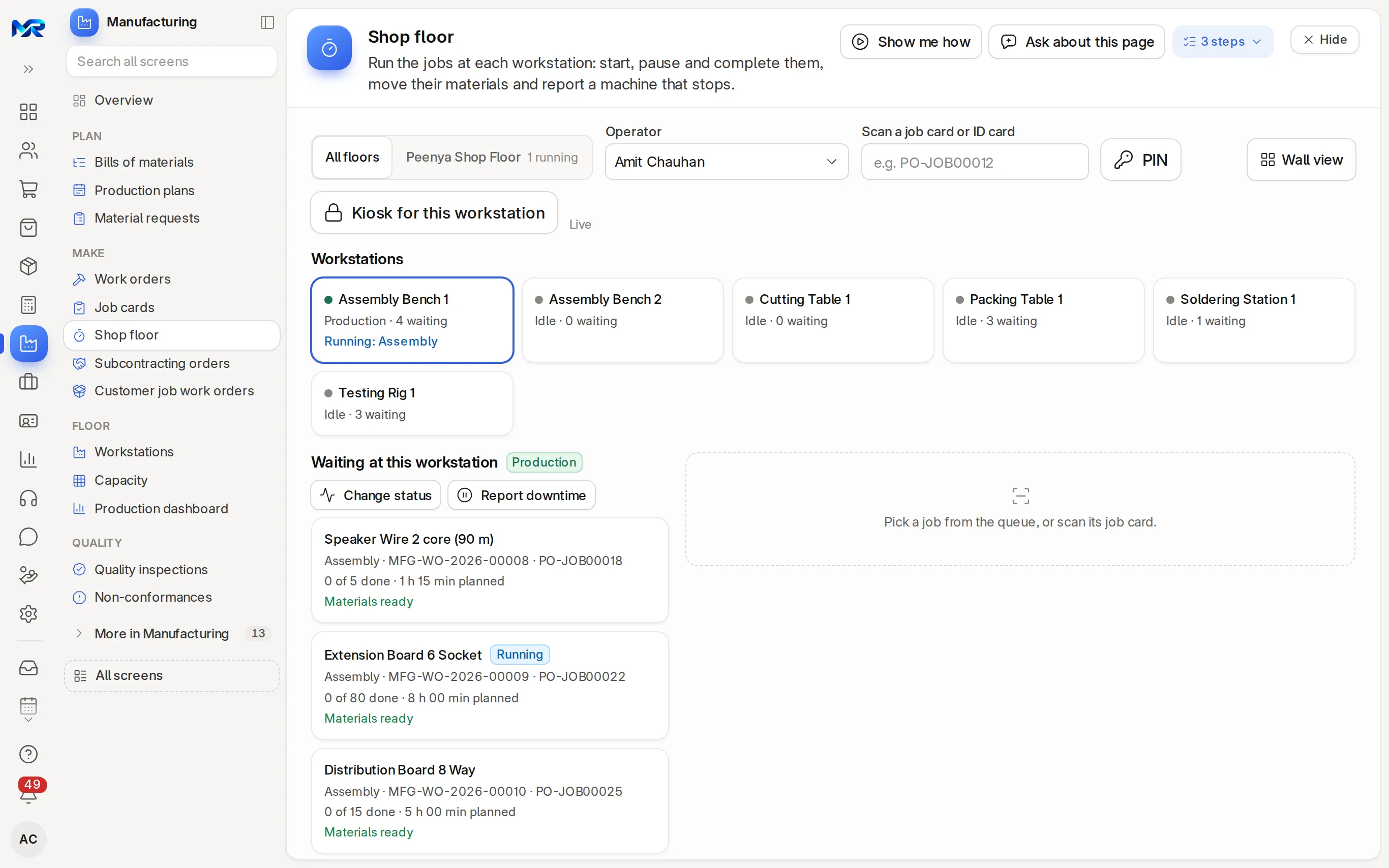
Shop floor is the page in MyRecords where operators run their jobs: pick a workstation, see what is waiting there, sign in with a 4-digit PIN, and start, pause, resume or complete a job card. It runs in a browser on a shared PC or tablet, can be locked to one workstation in full screen, and keeps taking actions when the network drops, sending them when it returns. Supervisors get a wall view with live timers.
-
Step 1
Lock a screen to a workstation
Kiosk for this workstation shows only that machine's jobs, and Full screen hides everything else.
-
Step 2
Operator signs in
With a 4-digit PIN or a scan of their ID card. An operator logs time only for themselves or for whoever signed in with a PIN on that screen.
-
Step 3
Pick the job
Waiting at this workstation lists its job cards. Scan a job card or tap it.
-
Step 4
Start, pause, complete
Transfer materials, follow the steps and instructions, Start, Pause with a reason, and Complete with the quantity finished and any process loss.
-
Step 5
Check quality on the spot
Type the inspection readings for the job without leaving the screen.
-
Step 6
Close the shift
The wall view shows live timers and paused jobs; Pause all at shift end and print the end-of-shift report.
The details
What it covers.
6 of 7 work today
- Works today 6
- Once connected 1
-
Offline queueWorks today
When the network drops, start, pause, resume and complete are kept on the device and sent when it is back. Anything refused is listed to enter on the job card.
-
DowntimeWorks today
Report downtime (F8) against the workstation with its reason. A stoppage longer than an hour alerts the Manufacturing Managers, and rising stoppages suggest maintenance.
-
Problem alertsOnce connected
Set the workstation to Problem and the Manufacturing Managers get a bell alert. A WhatsApp message too, once you connect WhatsApp Business.
-
Keys and scanningWorks today
F2 starts or pauses, F4 completes and F8 reports downtime; one scan box takes job cards and ID cards.
-
Always currentWorks today
The queue refreshes every 30 seconds and at once when another screen changes a job.
-
Instructions read aloudWorks today
Each job's steps and instructions on screen, read aloud. With the AI Assistant add-on they can first be translated into one of ten Indian languages.
-
Supervisor wall viewWorks today
Every workstation's live timer, paused jobs with their reasons, and Pause all at shift end.
Said plainly
Not there yet
- Machine counters or PLC signals. Operators enter the quantity made.
- A native tablet app. The screen runs in the browser on any PC or tablet.
Questions
Questions people ask
Something else on your mind?
Ask us anything about it. A person from our team replies.
Ask a question01What happens if the internet goes off mid-shift?
Operators keep working. Their start, pause, resume and complete actions wait on the device and are sent when the network is back.
02What hardware do I need?
Any PC or tablet with a current browser, and a barcode scanner if you want to scan job cards and ID cards. You buy the hardware.
03Can operators see costs or other parts of the system?
No costs. The Shop floor operator access pack runs jobs, reports stoppages and takes in-process readings, with read-only work orders and BOMs behind them. It cannot submit work orders.
04Can several operators share one screen?
Yes. Each signs in with their own 4-digit PIN, so time is logged against the right person.
05Do I need the Manufacturing module?
Yes. The Shop floor page runs the job cards that Manufacturing creates.
Last updated Applies to MyRecords 3 Nov 2026 release
Next step
See it on your own numbers.
A live demo on our sample company, with our team. Or ask us for a quote first.
Live demo
Book a walk-through
- On our sample company, for your kind of work
- A quote for the modules you need
- Your questions, answered by our team