















Accounting
Know who owes you, and chase it.
Dues aged by customer, reminders and statements from one page, and every promise to pay tracked.
All 9 parts work today
- Users
- Unlimited
- no per-user fee on any module
- Runs on
- Your server
- or a dedicated system on MyRecords Cloud
- Core ready in
- 1–2 weeks
- set up by our team with the modules you pick
How it works
Three steps, start to finish.
In short
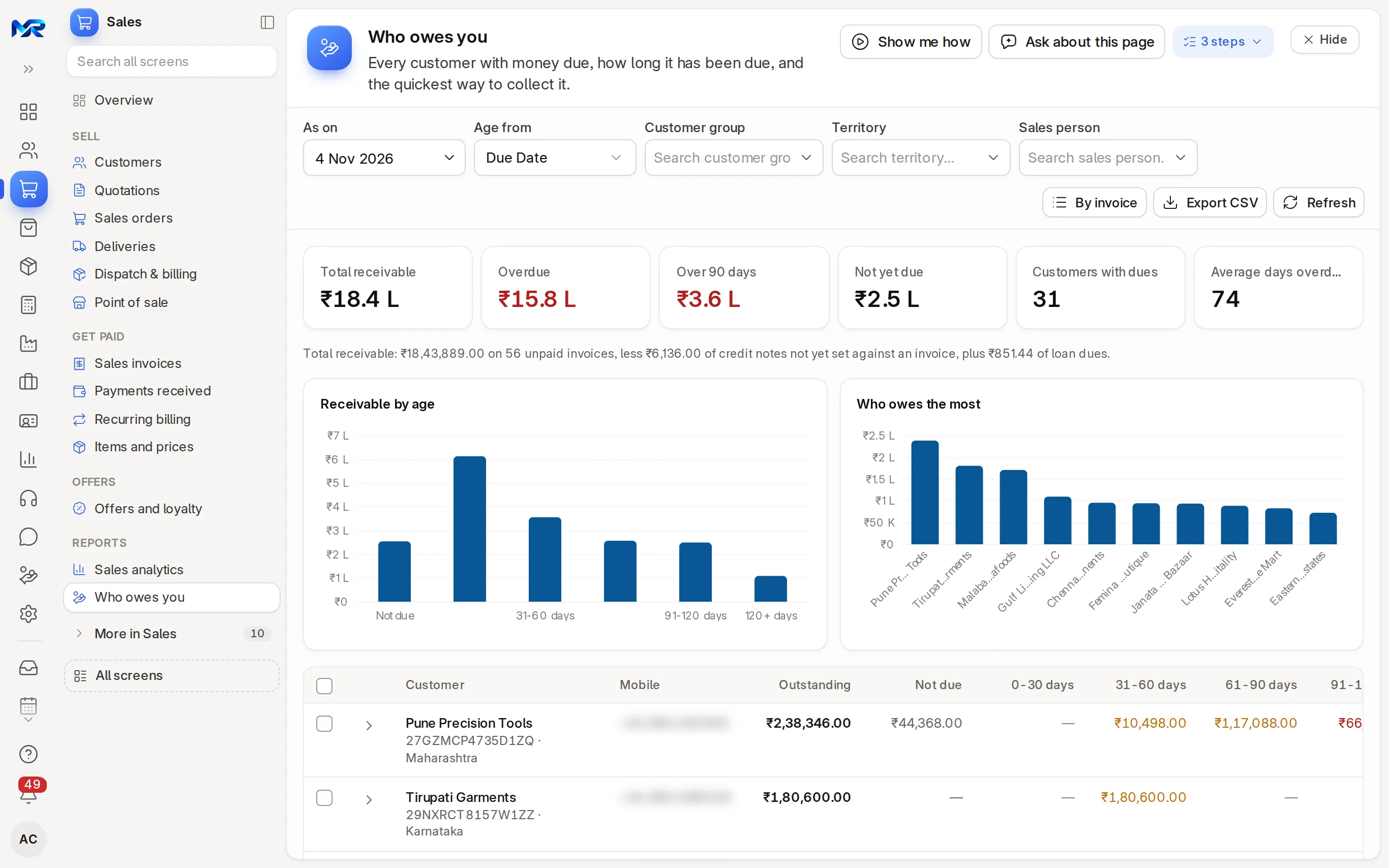
"Who owes you", under Sales, is the receivables page of MyRecords: every unpaid invoice by customer, aged by days past due, with a total that is the customers' balance in the ledger. From the same page you send reminders and statements, record a promise to pay, and mark an invoice disputed so it stops getting reminders. Payment speed shows which customers pay late and by how many days.
-
Step 1
See the ageing
Dues by customer in not due, 0–30, 31–60, 61–90, 91–120 and 120+ day columns, aged from the due date or the invoice date, with each customer's invoices one click away.
-
Step 2
Tick and remind
Tick customers and press Remind for all their unpaid invoices, or Send statements as PDFs. You see each message before it goes.
-
Step 3
Record what they promise
Note a promise to pay with a date. A follow-up is set, and a daily check tells you whether it was kept.
The details
What it covers.
9 of 9 work today
- Works today 9
-
Ageing that agrees with the booksWorks today
The total is the customers' balance in the ledger, in your company currency, so the CA's number and yours are the same. When it differs from the unpaid invoices (an advance, a credit note not yet set off), a line says why.
-
RemindersWorks today
By e-mail today. WhatsApp Business messages work once you connect your account; until then "Send from my phone" opens WhatsApp with the text ready. An invoice's "Send payment reminder" shows who it goes to, the channel and the exact text first.
-
Reminder planWorks today
An optional plan sends reminders before, on and after the due date, each step once, and lists today's reminders. It is off until you switch it on.
-
StatementsWorks today
The ledger or the unpaid bills with ageing, per customer, as a PDF to e-mail or download for many customers at once. A schedule can send them every month.
-
Promises to payWorks today
Record the amount and date a customer promises; a to-do reminds you, and a daily check marks the promise kept or broken.
-
Disputed invoicesWorks today
Mark an invoice disputed with a reason. It drops out of reminders and reminder letters until you mark the dispute resolved, and keeps its history.
-
Payment speedWorks today
Days from bill to payment and days late per customer, weighted by amount, with each customer's on-time share.
-
Sales staff see their ownWorks today
A sales person sees dues only for the customers they look after. Accounts staff and sales managers see all of them.
-
Who to collect from firstWorks today
"Look at these" on the Accounting home ranks overdue customers by amount and days late, weighted up for those who usually pay late.
Said plainly
Not there yet
- Payment links that match themselves to the invoice need your own Razorpay or Cashfree account; they work once you connect it.
- Automatic matching of bank receipts without importing the bank statement; automatic bank feeds are not available yet.
Questions
Questions people ask
Something else on your mind?
Ask us anything about it. A person from our team replies.
Ask a question01Can I send reminders on WhatsApp?
Yes, in two ways. Without any setup, a WhatsApp message opens on your phone with the reminder text ready to send. Sending from MyRecords through WhatsApp Business works once you connect your account and Meta approves the template.
02Will a customer get reminders for an invoice they are disputing?
No. A disputed invoice is left out of reminders, the reminder plan and reminder letters until you mark the dispute resolved.
03Can the CA see the same ageing?
Yes. Invite your CA with accounts access until a date you choose; they see the same page, and its total is the customers' balance in the ledger.
04Is there a weekly summary?
Yes. "E-mail me every Monday" sends what is overdue. Sales staff get their own customers; accounts managers get all of them.
05Can I send a statement every month without doing it by hand?
Yes. "E-mail it on a schedule" sets up a monthly statement for the customers you choose, and it goes out by e-mail with the PDF.
Last updated Applies to MyRecords 3 Nov 2026 release
Next step
See it on your own numbers.
A live demo on our sample company, with our team. Or ask us for a quote first.
Live demo
Book a walk-through
- On our sample company, for your kind of work
- A quote for the modules you need
- Your questions, answered by our team