















HR
Attendance and leave, balance first.
A daily board, a month muster, shifts, and leave applications that show the balance after the leave.
8 of 9 parts work today
- Users
- Unlimited
- no per-user fee on any module
- Runs on
- Your server
- or a dedicated system on MyRecords Cloud
- Core ready in
- 1–2 weeks
- set up by our team with the modules you pick
How it works
Five steps, start to finish.
In short
Attendance in MyRecords shows today's board (who is in, late, out or on leave), the month's muster for every employee, trends, exceptions, check-ins, requests and the shift roster. Leave applications show the days, the balance after the leave, team clashes and holidays before anyone approves. A month in a submitted pay run is locked, so the muster that paid salaries does not change afterwards.
-
Step 1
Set the rules
Holiday lists, shifts with grace minutes, and leave types with their allocation and sandwich rule.
-
Step 2
Mark the day
Employees check in from My HR or a biometric device. HR marks the rest, one day or a range at once.
-
Step 3
Fix the exceptions
Late, early, missing OUT, absent and unmarked days are listed, with each person's late pattern. Regularisation requests arrive with the check-in evidence. Repeated lateness can become a late-mark penalty, every so many late days made a half day.
-
Step 4
Apply and approve leave
The approver sees the balance after the leave, who else is off and the holidays in between.
-
Step 5
Lock the month
Once a month's pay run is submitted, only an HR Manager can change its days, with a reason. Lock this month on the pay run stops every change until HR unlocks it.
The details
What it covers.
8 of 9 work today
- Works today 8
- Once connected 1
-
Today's boardWorks today
In, late by so many minutes, out, out early, missing OUT and on duty, refreshed every minute, with a map of check-ins against the allowed radius.
-
The month musterWorks today
Every employee by day — present, absent, half day, leave or holiday. Click a cell to change, mark or regularise it, or select many cells at once. Muster roll as PDF and Excel.
-
Shifts and rosterWorks today
Shift types with grace time, and a month or week roster to assign, swap or repeat shifts. Copy last week in one step.
-
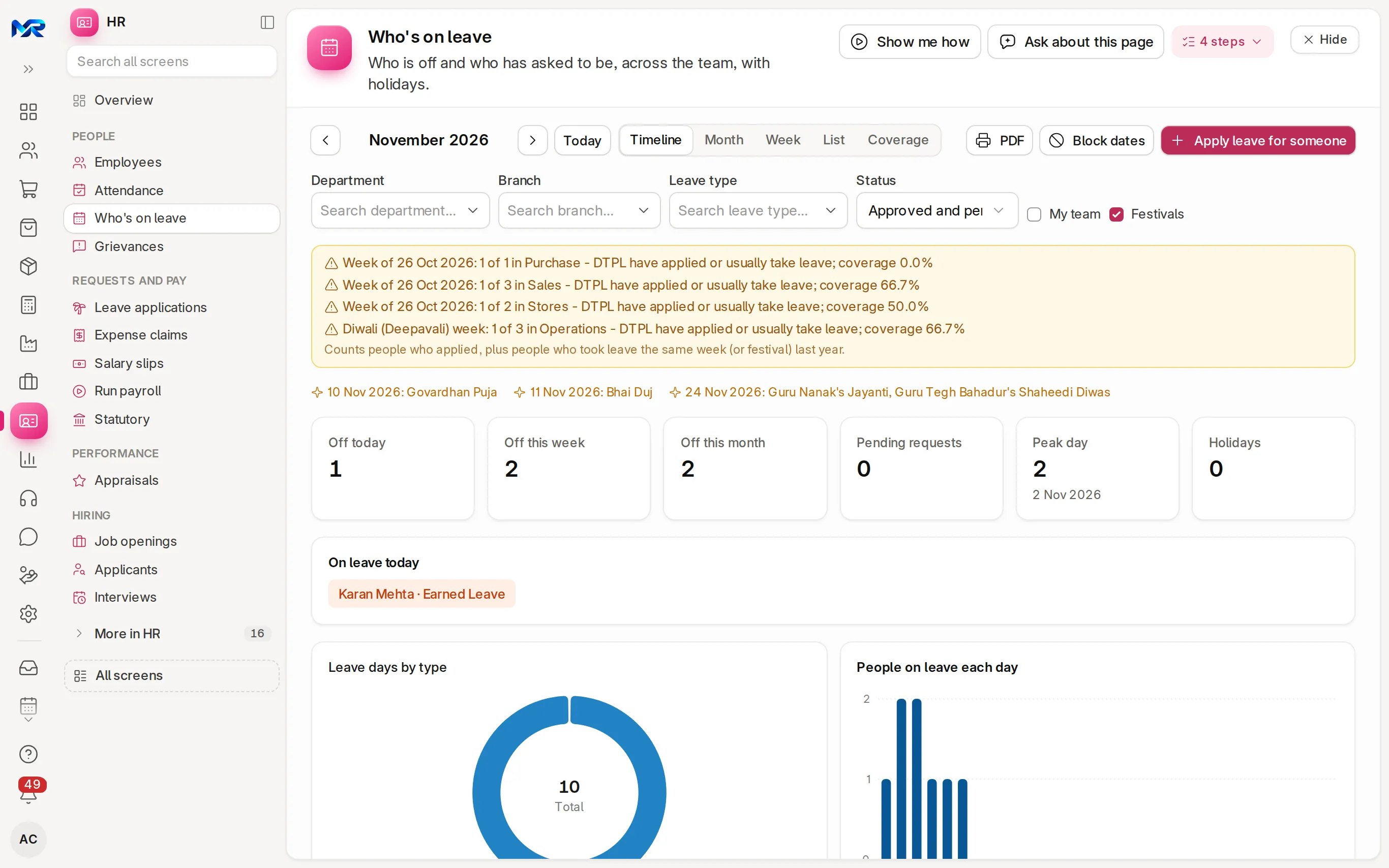
Who's on leaveWorks today
A team timeline, month or week, with pending leave dashed, holidays shaded, an Indian festival overlay and a warning when a department falls below its minimum staffing. HR Managers can block dates for leave.
-
Leave balancesWorks today
Every employee by leave type — allocated, used, pending, available. Adjust a balance, encash leave, and give comp-off for working on a holiday.
-
Suspicious punchesWorks today
Flags buddy punching, impossible travel between two check-ins, punches outside the allowed area and unusual IN times, for HR to review.
-
Check-in without networkWorks today
A check-in made offline is queued with the phone's time and sent later. HR can accept the phone's time within a tolerance they set.
-
Biometric devicesOnce connected
A push address for the sync tools of common devices, with a test punch that never counts. Works once your device is set to send to it; its punch file can be imported today.
-
Ask about attendanceWorks today
Type "Mark all Sales present on 24 Oct except Ravi" or "Who had more than 3 absents in September?". Rules read the usual sentences. With the AI Assistant add-on, AI reads the rest and a photo of a paper register, sorts regularisation requests (Classify with AI) and words the late pattern.
Questions
Questions people ask
Something else on your mind?
Ask us anything about it. A person from our team replies.
Ask a question01Can staff check in from their own phone?
Yes, from My HR in any phone browser. HR can turn on the phone's location with an allowed radius, so a check-in from outside the area is flagged.
02What happens when the network is down?
The check-in is queued on the phone with the phone's time and sent when the connection returns. The check-ins list shows HR a "Punched offline, not in attendance" tab, and "Use the phone's time" sets many at once.
03Can someone change attendance after salaries are paid?
Once a month's pay run is submitted, only an HR Manager can change a day, with a reason, and an unpaid day made paid offers a payroll correction. After Lock this month, changes to its attendance, leave, extra pay and slips are refused until HR unlocks it.
04Does it handle half days and comp-off?
Yes. Leave can be a half day, and working on a holiday can earn comp-off through a request the manager approves.
05Can managers see clashes before approving leave?
Yes. The application shows who else in the team is off, the holidays in between and the balance after the leave.
Last updated Applies to MyRecords 3 Nov 2026 release
Next step
See it on your own numbers.
A live demo on our sample company, with our team. Or ask us for a quote first.
Live demo
Book a walk-through
- On our sample company, for your kind of work
- A quote for the modules you need
- Your questions, answered by our team