















Accounting

GST invoices that get the tax right.

HSN on every line, the customer's GSTIN, and CGST + SGST or IGST chosen by place of supply.

All 9 parts work today

The tax lines here follow India’s GST. Outside India, invoicing works the same in your own currency, and your country pack sets the local tax lines and layout; we build and test it before go-live. Your country

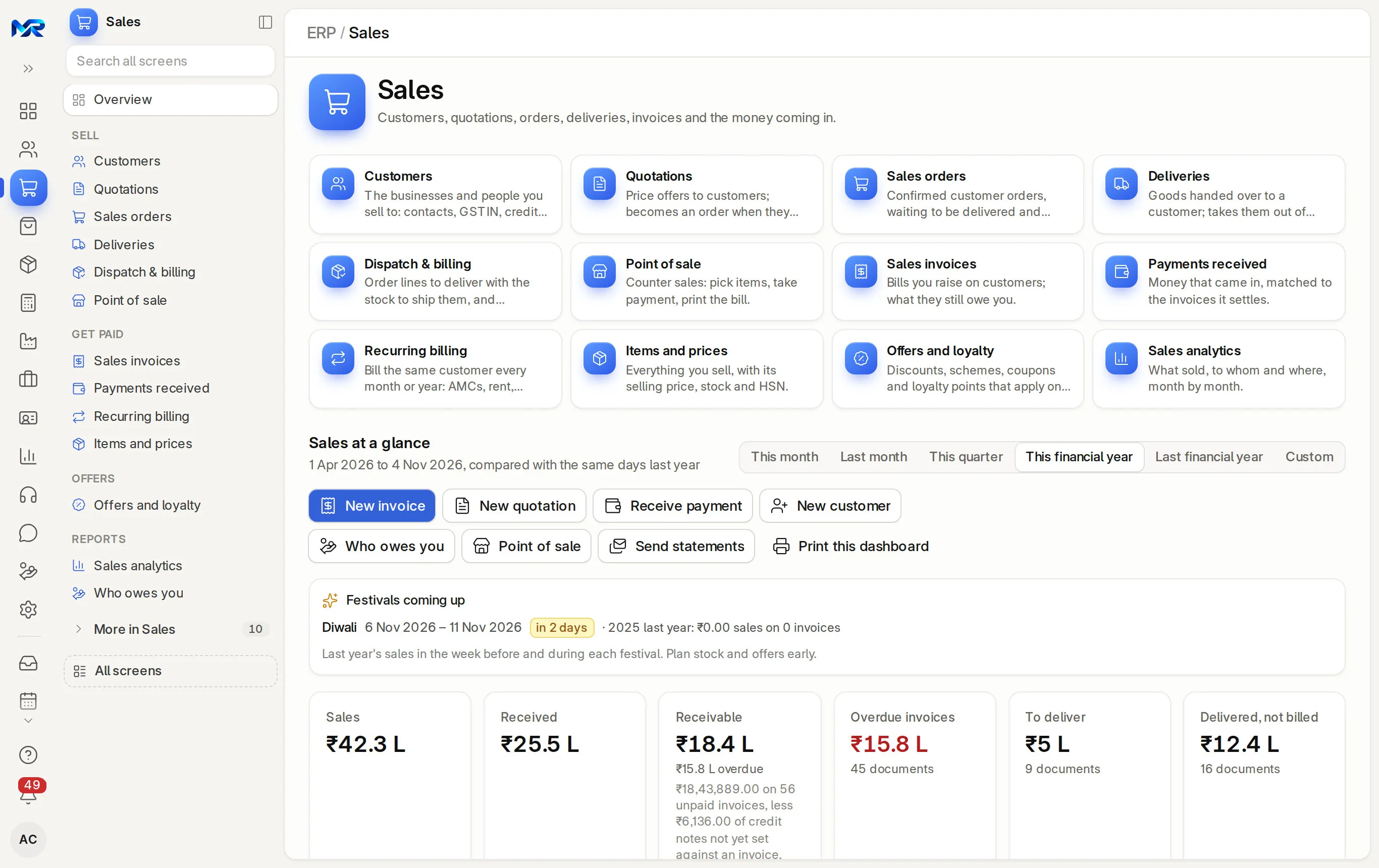
MyRecords Sales home: customers, quotations, orders, deliveries and invoices, with New invoice, sales figures for the year and festivals coming up.
The Sales home on the sample company. New invoice is one click away.
Part of
Accounting
Ledgers, bank reconciliation and financial statements, in your currency.
Users
Unlimited
no per-user fee on any module
Runs on
Your server
or a dedicated system on MyRecords Cloud
Core ready in
1–2 weeks
set up by our team with the modules you pick

How it works

Three steps, start to finish.

In short

With India compliance on, every sales invoice in MyRecords prints as a GST tax invoice by default: your GSTIN and the customer's, place of supply, HSN or SAC on each line, the tax per line and an HSN summary. The kind of GST follows the place of supply, so a sale inside your state carries CGST + SGST and one to another state carries IGST. Submitting the invoice posts it to the books and to the GSTR-1 data.

  1. Step 1

    Start from what you already have

    On a sales order, delivery or quotation, Create › Sales Invoice brings its lines, prices and taxes across. Dispatch & billing lists the deliveries still to bill.

  2. Step 2

    The tax sets itself

    The customer's state decides CGST + SGST or IGST, at each item's GST rate. A wrong kind of tax is switched before you save.

  3. Step 3

    Submit, print and send

    Submitting posts the invoice to the ledger. Print the GST tax invoice, e-mail it as a PDF, or share a short link to the PDF, which carries the UPI QR while the invoice is unpaid.

The details

What it covers.

9 of 9 work today

  • Works today 9
  1. The GST tax invoice printWorks today

    "Tax Invoice" with the copy line (original for recipient, duplicate for transporter, triplicate for supplier), both GSTINs, place of supply, "Tax payable on reverse charge", HSN/SAC and tax per line, an HSN summary and the amount in words.

  2. CGST + SGST or IGSTWorks today

    Set by place of supply against your company's GST state, on quotations, orders, deliveries and invoices. SEZ and export customers always get IGST. See place of supply.

  3. Credit and debit notesWorks today

    "Credit note (choose what)" on the invoice: all of it, some items or a price correction, with the GST reason and stock taken back when goods return. Notes print as such, with the invoice they correct. A supplier's bill gets "Debit note (choose what)".

  4. UPI QR for the exact amountWorks today

    An amount-coded UPI QR from your own UPI ID prints on unpaid invoices. The customer pays from any UPI app; you record the receipt.

  5. Recurring invoicesWorks today

    "Make recurring" repeats an invoice on a schedule, and Recurring billing bills the same customer every month or year: AMCs, rent, retainers.

  6. Bulk workWorks today

    Submit drafts, download PDFs as one zip, send payment reminders or reminder letters customer by customer, and see the GSTR-1 view of the invoices you tick.

  7. IRN and e-way bill on the printWorks today

    Once you record them, the IRN, Ack no., signed QR and e-way bill number print on the invoice. See e-invoicing.

  8. Other layoutsWorks today

    A simple invoice without GST details and an 80 mm shop receipt sit beside the GST tax invoice in the print menu. Orders print as a proforma invoice.

  9. The invoice's Accounting tabWorks today

    What the invoice posted, how it was settled (payments, journals, credit notes), TDS, reminders sent, and whether its period is locked.

Everything here works today on the demo company 9 of 9

Try it

See it work on sample data.

A fictional company, played step by step. The live demo has the real screens; ask us for a demo sign-in.

Place of supply 29-Karnataka is the seller’s own state, so CGST 9% + SGST 9%.

Total either way ₹1,15,734

Shree Lakshmi Hardware Pvt Ltd

No. 18, 4th Cross, Kalasipalya, Bengaluru, Karnataka 560002

GSTIN: 29AAKCS4821M1ZS

Tax Invoice

Original for recipient

Bill to
Kaveri Agencies
Sayyaji Rao Road, Mysuru, Karnataka 570001
GSTIN: 29AAJFK3307C1ZL
Invoice no.: ACC-SINV-2026-00418
Date: 03-11-2026
Place of supply: 29-Karnataka
Tax payable on reverse charge: No
#DescriptionHSN/SAC QtyRate Taxable valueGST % CGSTSGST/UTGST
1 OPC 53 grade cement, 50 kg bag120 Bag × ₹ 315.00 = ₹ 37,800.00 2523 120 Bag ₹ 315.00 ₹ 37,800.00 18.0 ₹ 3,402.00 ₹ 3,402.00
2 MS hex bolt M12 × 75, box of 5040 Box × ₹ 685.00 = ₹ 27,400.00 7318 40 Box ₹ 685.00 ₹ 27,400.00 18.0 ₹ 2,466.00 ₹ 2,466.00
3 uPVC pipe 1 inch, 6 m length60 Nos × ₹ 548.00 = ₹ 32,880.00 3917 60 Nos ₹ 548.00 ₹ 32,880.00 18.0 ₹ 2,959.20 ₹ 2,959.20
Amount in words
INR One Lakh, Fifteen Thousand, Seven Hundred And Thirty Four only.
Taxable value₹ 98,080.00
CGST₹ 8,827.20
SGST/UTGST₹ 8,827.20
Rounding₹ -0.40
Total₹ 1,15,734.00

Fictional Bengaluru dealer. All three items carry 18% GST, their rate since 22 Sep 2025.

Said plainly

Not there yet

  • Payment links with automatic matching need your own Razorpay or Cashfree account; they work once you connect it.
  • Invoice prints in languages other than English.
  • Local tax invoices outside India; they need a country pack, which we build before go-live.
What comes next, on the roadmap

Questions

Questions people ask

Something else on your mind?

Ask us anything about it. A person from our team replies.

Ask a question
01Is the default print a proper GST tax invoice?

Yes. Since 1 Nov 2026 the default sales invoice print is the GST tax invoice wherever India compliance is on, with HSN or SAC, both GSTINs, place of supply and tax per line.

02What if my customer is in another state?

The invoice carries IGST at the item's GST rate instead of CGST + SGST. MyRecords reads the place of supply on the invoice, else the customer's GSTIN, else their address.

03How many HSN digits does the invoice show?

What your item master holds. A company setting says how many digits you must show (4 up to ₹5 crore turnover, 6 above), and items short of it are flagged.

04Can I change the invoice layout?

Yes. Your logo, letter head, terms and bank details go on every print. Changes beyond that are quoted as custom work.

05Does the invoice update the books on its own?

Yes. Submitting posts the customer's debit, sales and the GST accounts, and the invoice shows as unpaid until a payment settles it. A draft posts nothing.

Next step

See it on your own numbers.

A live demo on our sample company, with our team. Or ask us for a quote first.

Get a quote

Live demo

Book a walk-through

  • On our sample company, for your kind of work
  • A quote for the modules you need
  • Your questions, answered by our team